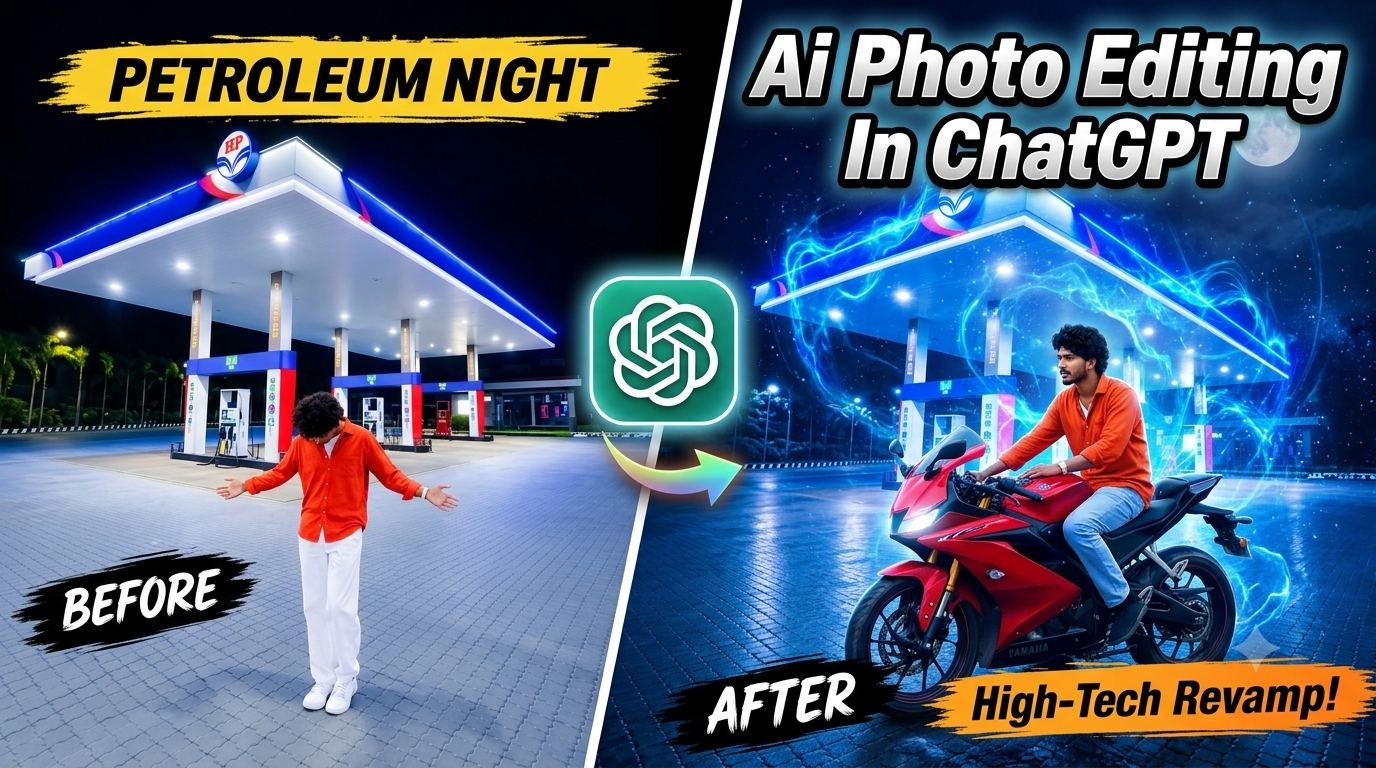
Instagram aur Facebook jaise social media platforms par aajkal dark aesthetic aur cinematic night photos ka craze bahut teji se badh raha hai. In sabhi trends mein sabse zyada pasand kiya jane wala concept hai Trending Petrol Pump AI Photo Edit. Raat ke andhere mein petrol pump ki chamakti blue-red neon lights, upar se aati white canopy lights, aur zameen ke tiles par padte natural reflections har normal photo ko ek stylish cinematic look de dete hain.
Pehle aisi photo banane ke liye expensive camera, professional lighting, aur ghanton Photoshop sikhne ki zarurat hoti thi. Lekin aaj artificial intelligence ki madad se koi bhi beginner aisi photo sirf 2 se 3 minute mein bana sakta hai. Is aasan guide mein hum bilkul simple shabdon mein samjhenge ki kaise aap apne mobile se hi AI tools ka use karke aisi viral photo generate kar sakte hain. Is edit mein use hone wala official master prompt aapko hamari website royeditz.in par mil jayega.
Yeh Photo Edit Kyun Itni Viral Ho Rahi Hai?
Petrol pump par raat ke waqt lighting ka setup naturally bahut cinematic hota hai.
Upar Ki White Lights: Canopy ke neeche lagi lights direct aapke sar aur kandhon par padti hain, jisse photo crisp dikhti hai.
Side Ki Neon Glow: Petrol pump ke boards se aane wali blue aur red lights body ke kinaron par ek soft glow banati hain.
Zameen Ke Reflections: Road ya tiles par padne wali halki parchhai photo ko 100% real banati hai, jisse photo kisi ko bhi fake ya sticker jaisi nahi lagti.
Jab hum Realistic Night Photo Editing Prompt ka use karte hain, toh AI automatically in saari lights aur shadows ko aapki body par perfectly match kar deta hai.
Official Master Reference Prompt
Is photo ko banane ke liye aapko 2 photos ki zarurat padegi:
Photo 1 (Aapki Photo): Jismein aapka chehra aur pose saaf dikh raha ho.
Photo 2 (Background Photo): Ek khali petrol pump ki night photo (jo aap royeditz.in se save kar sakte hain).
AI tool mein paste karne ke liye neeche diya gaya prompt copy kar lijiye:
ChatGPT Par Photo Banane Ka Step-by-Step Aasan Process
ChatGPT se aisi photo banana sabse aasan aur accurate hai. Bas in 5 simple steps ko follow karein:
Step 1: App Open Karein
Apne mobile mein ChatGPT open karein. Make sure karein ki screen par GPT-4o model select ho, kyunki yahi model do photos ko aapas mein jod sakta hai.
Step 2: Dono Photos Upload Karein
Message box ke bagal mein bane + (Plus) icon par tap karein. Ab apni gallery se pehle apni photo (Photo 1) aur fir petrol pump wali photo (Photo 2) dono ek sath select karke chat mein layein.
Step 3: Prompt Paste Karein
Ab text box mein upar diya gaya master prompt paste kar dein. Prompt ke last mein bas itna aur likh dein: “Do not change my face, keep it 100% natural.”
Step 4: Send Button Dabayein
Arrow icon par tap karke message send kar dein. ChatGPT 20 se 30 second lega aur aapki photo ko background ke sath natural lights aur shadows ke sath jod kar nayi photo bana dega.
Step 5: Photo Save Karein
Jo photo ban kar aayi hai, us par click karein aur upar bane download arrow se use seedhe apni gallery mein high quality mein save kar lein.
Google Gemini Par Photo Banane Ka Step-by-Step Process
Agar aap Google Gemini ka use kar rahe hain, toh process aur bhi seedha hai:
Step 1: Gemini Open Karein
Apne phone ke browser ya Gemini app ko open karein.
Step 2: Photos Select Karein
Neeche bane + (Plus) ya gallery icon par click karein aur apni photo aur petrol pump background photo dono upload kar dein.
Step 3: Simple Instruction Type Karein
Text box mein likhein: “Image 1 is my photo and Image 2 is background. Place me into Image 2.” Iske theek baad master prompt paste kar dein.
Step 4: Generate Par Click Karein
Send par tap karein. Gemini zameen ki tiles aur lighting ko match karke ek sharp DSLR-look photo generate karega.
Step 5: Download Karein
Photo aane ke baad download icon par click karke use gallery mein save kar lein.
Conclusion
Trending Petrol Pump AI Photo Edit banana ab mushkil nahi raha. Bas sahi prompt aur sahi reference image ke sath koi bhi beginner kuch hi minutes mein professional-looking cinematic night photos bana sakta hai. Upar bataye gaye aasan steps ko follow karein, alag-alag tools par try karein aur apni social media profile ke liye zabardast aesthetic photos ready karein. Happy editing!


Use the first photo as the exact reference for the person and the second photo as the background/location. Place the same person from the first image naturally into the second image, standing in front of the HP petrol pump at night in the same open-arms pose. Keep his face, hairstyle, skin tone, body shape, clothes, hands, arms and overall proportions exactly the same as the first photo – do not change or regenerate his face. Match his height and scale naturally with the petrol station environment. Make the lighting, shadows, reflections and perspective perfectly consistent with the night-time petrol pump scene. Keep the large petrol station canopy, pumps, trucks, road and surrounding lights clearly visible in the background. Create a highly realistic DSLR-style composite with sharp natural details, realistic skin and fabric texture,cinematic night lighting, subtle blue/red petrol-pump glow, natural ground shadows and reflections. The final image must look like an authentic photograph.