
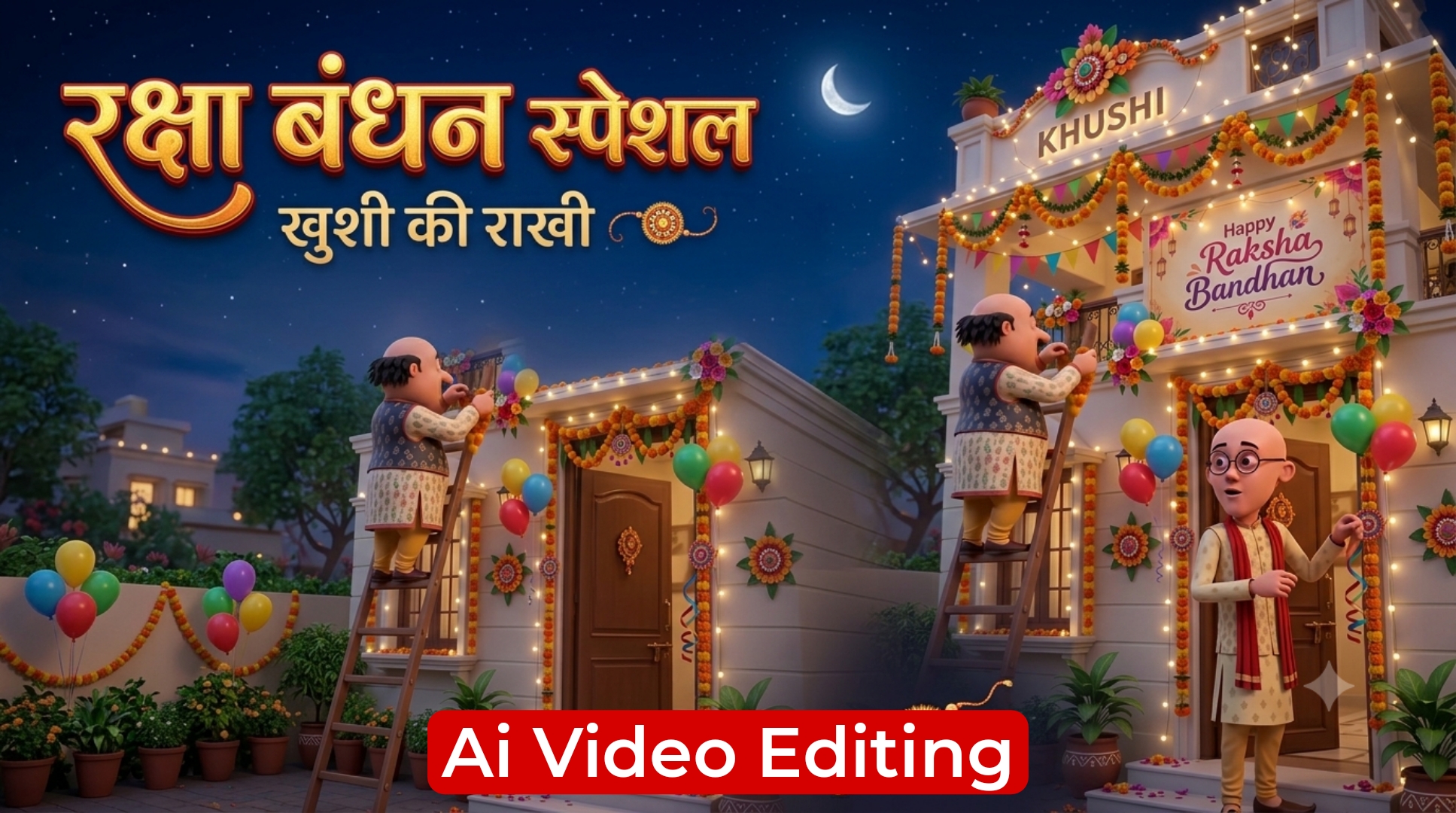
Raksha Bandhan har saal sibling bond celebrate karne ka sabse pyara festival hota hai, par social media platforms par simple wishes ya photos post karne ke bajaye customised 3D animated name video greetings ka craze sabse tez ho chuka hai. Instagram Reels aur YouTube Shorts par Motu Patlu jaise famous animated characters ke sath personalized nameplate wali videos million views cross kar rahi hain.
Agar aap bhi apne naam ya apni behen ke naam ke sath ek realistic 3D Rakhi festive video create karna chahte hain, toh yeh complete step-by-step workflow guide aapke liye perfect hai. Is article mein hum janenge ki kaise aap Happy Raksha Bandhan Motu Patlu AI text name video editing prompt ka use karke text-to-photo aur fir photo-to-animated video generate kar sakte hain.
Motu Patlu Rakhi AI Video Trend Kyun Ho Raha Hai Viral?
Social media par standard Rakhi status ke mukable animated festive videos zyada retention create karti hain. Iske piche ke mukhya factors yeh hain:
High Nostalgia & Emotional Connect: Motu Patlu popular cartoon characters hain, jinki funny festive vibes har age group ko attract karti hain.
Personalized 3D Glowing Name: Video mein jab user ka apna personalised name glowing 3D letters mein display hota hai, toh video customised aur premium lagti hai. Realistic Lip-Sync & Hindi Dialogue: Characters directly viewer ya specific sibling ka naam lekar wish karte hain, jisse reel par instant shareability aur reach increase hoti hai.
Step 1: Website Se Master Photo Prompt Copy Karein
Sabse pehle aapko high-quality 3D character photo generate karne ke liye authentic prompt copy karna hoga.
- Apne mobile browser mein royeditz. in official website open karein.
- Search bar mein Motu Patlu Raksha Bandhan AI Prompt search karein.
Niche diya gaya standard 3D photo prompt copy kar lein:
Photo Prompt’
A vibrant 3D animation-style scene of two cartoon characters, resembling Motu and Patlu, decorating the exterior front entrance of an Indian house for the Raksha Bandhan festival in the evening. Characters & Action: On the left, a chubby cartoon man with a prominent moustache, wearing a patterned cream kurta, navy blue embroidered vest, and yellow churidar trousers, stands on a tall wooden ladder hanging orange and yellow marigold garlands. On the right, a tall, slender bald cartoon man wearing round spectacles, a beige patterned kurta, and a red scarf draped over his shoulder stands on the porch steps, tying festive balloons and hanging ribbons by the front door. Decorations & Setting: The house is decorated with glowing warm fairy lights, colourful triangular bunting flags, and marigold toran garlands framing the doors and windows. A prominent illuminated banner on the wall reads "Happy Raksha Bandhan" in elegant calligraphy with floral artwork. At the top of the porch facade, a glowing warm 3D sign displays the name "KHUSHI" beneath a large decorative floral crest. The ground features terracotta flower pots, glowing warm diyas, and scattered flower petals on the porch steps. Style & Lighting: 3D Pixar/Disney animation render, ultra-detailed textures, warm festive golden lighting, cinematic dusk atmosphere, sharp focus, 8k resolution, vertical 9:16 aspect ratio.
Step 2: ChatGPT / DALL-E 3 Par 3D Rakhi Photo Generate Karein
Ab copy kiye gaye prompt se high-resolution 3D festive base image render karni hai.
Ab copy kiye gaye prompt se high-resolution 3D festive base image render karni hai.Apne mobile mein ChatGPT app ya web version open karein.Chat prompt box mein copy kiya hua Photo Prompt paste karein.Prompt ke andar “KHUSHI” text ki jagah apna ya jiske liye video bana rahe hain uska name replace karein.Generate / Submit arrow icon par click karein.Kuch hi seconds mein ChatGPT ek vibrant 3D festive background image render kar dega.
Step 3: Generated 3D Photo Ko Download Aur Check Karein
Video generation smooth rakhne ke liye image quality clean hona zaroori hai.
Generate hui photo par tap karke full preview check karein.Confirm karein ki building facade par glowing nameplate aur Happy Raksha Bandhan banner bilkul clear aur correctly spelt hai.Top right corner par download icon par click karke image ko mobile gallery mein save kar lein.
Step 4: Website Se Video Animation Prompt Copy Karein
Photo download hone ke baad ab aapko dynamic voice dialogue aur animation generate karne ke liye secondary video prompt copy karna hoga.
Wapas royeditz.in post par jayein.
Scroll down karke Video Prompt section par aayein.
Niche diya gaya script dialogue prompt copy karein:
Video Prompt:
Patlu: "Hello Khushi ji! Aapko aur aapke poore parivaar ko Raksha Bandhan ki advance mein bahut-bahut badhai!" Motu: "Khushi ji, aapki nayi reel to trending mein number one chal rahi hai! 2 million views cross ho gaye hain, ab to jashn hona chahiye!"
Create Ai Video
Step 5: YouTube / AI Video Creation Tool Se Animated Video Generate Karein
Ab final step mein image aur dialogue prompt ko combine karke talking video create karni hai.
Apne smartphone mein YouTube app open karein.Bottom bar mein Plus (+) icon par click karein aur Short / Create Video select karein. Add your photo ya Generate video with AI feature par tap karein. Describe your idea text box mein copy kiya hua Video Prompt paste karein. Prompt mein script name (e.g., Khushi ji) ko apne custom character name se replace karein.Add Image option par tap karke Step 3 mein download ki hui 3D photo select karein.Generate button par click karein aur rendering complete hone ka wait karein.
Bonus Tip: Viral Engagement Ke Liye Video Post-Processing
Video ready hone ke baad direct publish karne ke bajaye yeh optimisation add karein:
- Custom Subtitles: VN ya CapCut editor mein video import karke dynamic festive colored auto-captions add karein taaki mute sound par dekhne wale viewers ka bhi retention barkarar rahe.
- Festive Dhol BGM: Background mein 10% volume par traditional soft Shehnai ya festive Dhol instrument sound layer karein jisse audio professional sound kare.
Conclusion
- Motu Patlu 3D AI animation festival editing is Raksha Bandhan sabse fast-growing visual trend hai. Upar bataye gaye step-by-step method se aap Royeditz. in se prompts copy karke bina kisi complex 3D software ke minutes mein customised talking video taiyar kar sakte hain. Apne creative name experiments try karein aur is festive season apni reels ko viral banayein.