
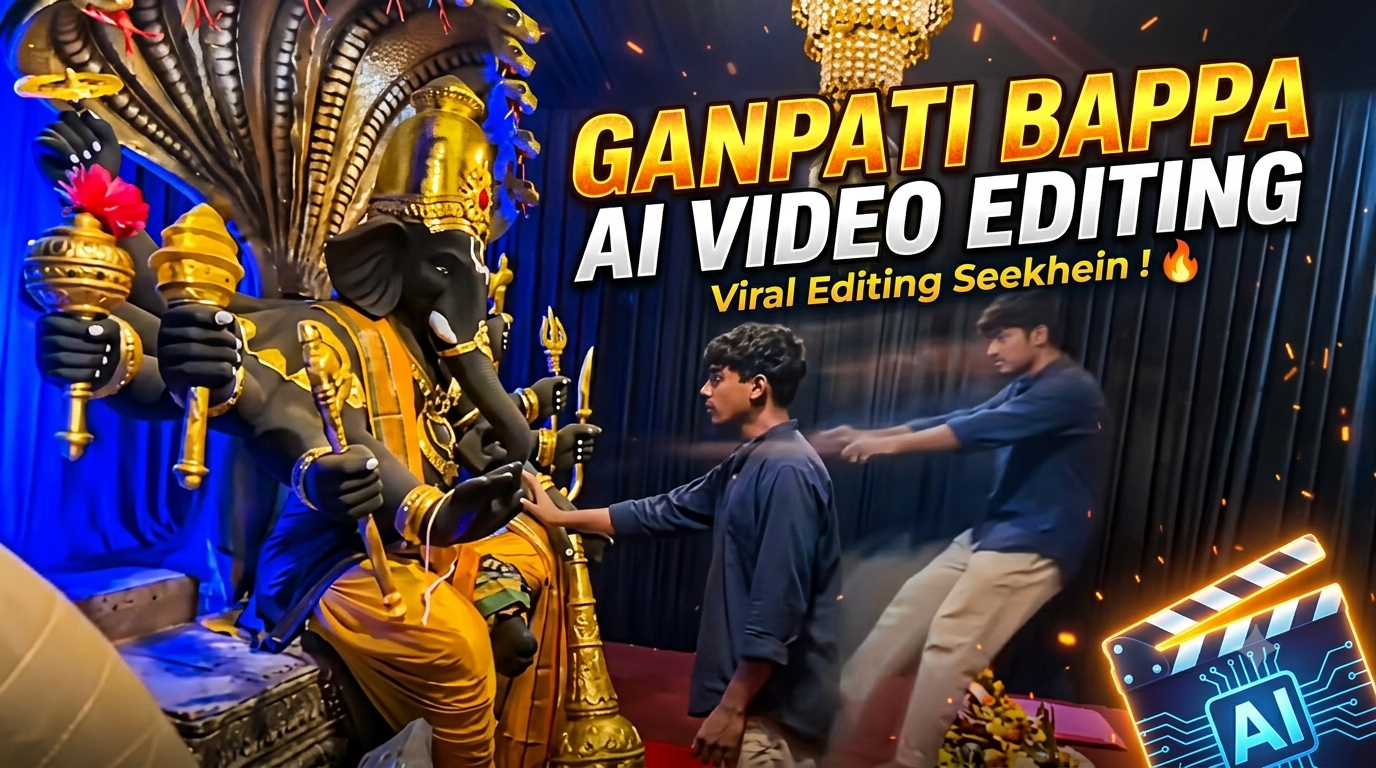
Aaj kal Instagram Reels aur YouTube Shorts par devotional content ka reach exponential level par chal raha hai. Khaskar festival season ya daily morning routine feeds par Trending Ganpati Bappa AI Video Editing Prompt sabse tezi se viral hone wala topic ban chuka hai.
Lekin bohot se beginner creators ke sath issue ye hota hai ki unka AI model ya toh face distort kar deta hai, ya phir mandir aur idol ki details unrealistic lagne lagti hain. Is comprehensive guide mein hum seekhenge ki kaise modern generative visual tools aur royeditz.in ke specific prompt parameters ka use karke ultra-realistic, cinematic visual fantasy reel create ki ja sakti hai bina kisi advanced 3D modelling software ke.
1. Ganpati Bappa AI Video Create Karne Ke Liye Essential Requirements
AI video generation shuru karne se pehle kuch basic tools aur hardware/software setups ka hona zaroori hai taaki aapka workflow smooth rahe:
A. Hardware Requirements
Smartphone ya PC: Minimum 4GB RAM wala Android/iOS smartphone chalega, par agar PC ya laptop (8GB RAM ya higher) ho toh prompting aur browser workflow aur tez ho jata hai.
Fast Internet Connection: Image upload aur AI video render cloud server par hota hai, isliye 10-20 Mbps ka stable internet connection zaroori hai taaki connection timeout na ho.
B. Software & Platform Requirements
Web Browser: Google Chrome, Brave, ya Microsoft Edge (Updated version).
Resource Platform: royeditz.in (prompt copy karne aur updated parameters fetch karne ke liye).
AI Tool Platform: Google AI Studio / Google AI Flow ya supportive multi-modal AI platform.
Mobile Video Editing App: VN Video Editor ya CapCut (colour grading, overlays aur music sync ke liye).
C. Creative Assets
Clear Face Portrait: Ek clean, front-facing portrait photo jisme background simple ho aur aapke chehre par acchi lighting ho.
High-Quality Audio: Devotional ambient flute music ya heavy Dhol-Tasha background track (copyright-safe).
2. Devotional AI VFX Reels Ka Viral Factor Aur Viewer Psychology
Jab koi user feed scroll karta hai, toh pehle do seconds ka visual hook hi tay karta hai ki user video dekhega ya swipe kar dega. Normal photo edits ke muqable cinematic volumetric lighting, dynamic shadows, aur devotional ambience high watch-time generate karte hain.
Contrast & Depth: Graphite-black murti ke sath glowing electric-blue fabric aur gold accessories high dynamic contrast create karte hain, jo screen par visually engaging lagta hai.
Micro-Details: Chandelier reflection, havan/puja plate brass texture, aur drapes ki realistic physics video ko real film shoot jaisa feel deti hai.
High Retention: Jab visual output clean aur artefact-free hota hai, toh audience loop mein video dekhti hai, jisse platform algorithm aapki reel ko organic explore section mein push kar deta hai.
3. The Master Copy-Paste AI Prompt (Cinematic Devotional Scene)
Neeche diya gaya official cinematic text prompt high-resolution details generate karne ke liye carefully balance kiya gaya hai. Isme character, camera aspect ratio, lighting style aur temple decorations sabhi cheezein defined hain:

Create a near-square devotional VFX fantasy video inside a richly decorated Ganesh pandal hall. A young barefoot devotee with curly dark hair, light stubble, a dark navy button-up kurta-shirt, and beige trousers stands before a colossal graphite-black Ganesha murti seated in lalitasana on a carved throne. Ganesha wears a golden jeweled crown, white tusks, a left-curving trunk, multiple arms holding a mace, trident, sword, fly-whisk, and blessing hand, a mustard-yellow dhoti with green sash, and detailed gold jewelry. A seven-hooded cobra canopy fans behind the idol with visible red tongues, with a grey mushika at the feet and red cloth at the base. The hall has electric-blue glowing drapes, black curtain walls, crystal chandeliers, a red carpet, and an offering table with fruit plates, brass lamps, a small Ganesha idol, and a pink cloth/book. Camera direction: Start with only a brief small front-facing camera shot showing the devotee approaching and looking up at Bappa. Then transition into the entire main sequence from the RIGHT SIDE of Bappa, maintaining a cinematic side perspective. In the right-side view, frame the devotee through the foreground silhouette of Bappa’s black head/tusk and a golden kalasha topped with a huge magenta flower. The devotee slowly extends his arm toward the deity with awe and solemn focus. Cut to an extreme macro close-up of his fingertip touching Bappa’s black finger with a gold-tipped nail, creating a dramatic Creation-of-Adam-style contact with blue-gold bokeh. Immediately at the touch, keep the devotee’s real body physically anchored with his hand resting on Bappa’s forearm, while a translucent, motion-blurred duplicate of the same devotee emerges from him and is pushed/levitated backward and upward across the hall toward the right side of the frame, arms outstretched, drifting farther away frame by frame. The ghost duplicate passes visually beyond the offering table and continues toward the edge of the frame. Keep the camera locked in the right-side wide perspective during the VFX payoff so the supernatural movement feels clear and realistic. End mid-float. Highly realistic cinematic VFX, devotional atmosphere, stage-lit saturation, blue-versus-gold contrast, warm chandelier glints, realistic fabric and skin textures, volumetric light, subtle incense haze, physically accurate shadows, natural motion blur, detailed jewelry, cobra tongues, mushika, fruit thali, brass lamps, bare feet on red carpet. No dialogue, no lip-sync, no text, no subtitles. Temple bells and deep devotional score implied. Preserve the exact identity and appearance of the devotee throughout; no face distortion, no extra people, no unnecessary background changes.
4. Prompt Ke Technical Anatomy Ko Samajhna (Beginner Breakdown)
Agar aap prompt ke structural blocks ko samajh lenge, toh aap future mein khud ke prompts bhi bina kisi error ke craft kar sakenge:
Aspect Ratio & Framing: near-square devotional VFX fantasy video
Yeh tag platform ko instructions deta hai ki composition centre-weighted rakhe taaki mobile viewing standard par koi important visual element cut na ho.
Subject Description: young barefoot devotee with curly dark hair… navy button-up kurta-shirt
Aapke character ki dressing simple aur grounded honi chahiye taaki centre of attraction Bhagwan Ganesha ki murti bane.
Idol Iconography: colossal graphite-black Ganesha murti seated in lalitasana… seven-hooded cobra canopy
Traditional postures aur symbols ka exact naming AI model ko distorted limbs ya unwanted artefacts banane se rokti hai.
Environment & Lighting: electric-blue glowing drapes, black curtain walls, crystal chandeliers
Deep black backgrounds ke upar glowing blue tone ek ultra-modern cinematic VFX look introduce karta hai.
5. Step-by-Step Practical Workflow: Photo Upload Se Video Generation Tak
Is pure workflow ko follow karke aap easily apni custom reel generate kar sakte hain:
Step 1: Prompt Resource Collect Karein
Sabse pehle official website royeditz.in par jayein.
Wahan se latest Trending Ganpati Bappa AI Video Editing Prompt ko copy karein aur apne notepad mein save kar lein.
Step 2: Google AI Workspace Setup
Google AI Studio ya Google AI Flow interface open karein.
Ek naya project ya prompt session initiate karein jahan multi-modal input (text + image) supported ho.
Step 3: Reference Photo Upload
Media Upload button par click karein aur apni front-facing portrait photo ko select karein.
Make sure photo blur na ho aur daylight ya clean soft light mein click ki gayi ho. Isse AI facial features ko accurately capture kar pata hai.
Step 4: Reference Binding Ke Sath Prompt Enter Karein
Prompt box mein copied prompt paste karein.
Prompt ke starting mein reference linking tag add karein:
“Maintain facial resemblance and features from the attached input reference photo for the barefoot devotee character: ” followed by the master prompt.
Step 5: Render Parameters Configure Karein
Aspect Ratio: Choose 9:16 (vertical reel format) ya 4:5 (near-square frame).
Motion Scale: 3 to 5 ke darmiyan rakhein. High motion dene par haath ya facial expressions melt ho sakte hain.
Run/Generate: Generate button par tap karein aur render complete hone ka wait karein.
6. Mobile Video Editor Mein Final Post-Processing & Colour Grading
AI se generated raw clip ko direct post karne ke bajaye thoda sa post-processing touch dene se video fully professional lagne lagti hai:
Step-by-Step VN / CapCut Polish:
Dynamic Camera Keyframing: Clip import karein aur shuruat se lekar aakhiri tak ek subtle 0.05x Slow Push-In Zoom add karein. Yeh visual depth ko multiply kar deta hai.
Atmospheric Dust & Light Overlay: Ek free stock “Golden Dust Particles” ya “God Rays” overlay video layer par add karein, blending mode Screen set karein aur opacity ko 25% – 30% par set karein.
Colour Tuning:
Contrast: +8%
Highlights: -5% (taaki gold jewellery over-exposed na lage)
Sharpness: +12% (brass textures aur intricate carving details crisp karne ke liye)
Sacred Audio Placement: Clip par authentic Shankh naad, traditional Dhol Tasha beat, ya calming flute background music sync karein.
7. Platform Upload Settings & SEO Best Practices
Reel ki quality tabhi maintain rahegi jab aap export aur metadata optimisation par dhyan denge:
Lossless Export: Hamesha 1080p resolution, 60 FPS, aur high bitrate (minimum 25-30 Mbps, codec H.264) par video export karein.
Thumbnail Selection: Video ke us frame ko cover photo banayein jahan Ganpati Bappa ki graphite idol aur glowing chandelier sabse clear aur eye-catching dikh rahe hon.
Caption Structure: Short devotional shloka ya caption ke sath trending tags use karein jaise #GanpatiBappaVFX, #AIVideoEditing, #CinematicDevotion.
Bonus Tip: Distortion-Free Output Ke Liye ‘Negative Prompting’ Technique
Kai baar AI tool random extra hands ya distorted facial lines generate kar deta hai. Is visual defect se bachne ke liye tool ke Negative Prompt input box mein ye parameters paste karein:
“extra hands, deformed fingers, unrealistic face symmetry, oversaturated neon, low-res textures, cartoonish rendering, missing limbs, blur, noisy background, watermark.”
Yeh small command AI model ko strict visual boundaries mein baandh deti hai, jisse first attempt mein hi studio-grade render ready ho jata hai.
Conclusion
Trending AI devotional video creation ab sirf bade visual studios tak limited nahi hai. Sahi structured prompt syntax, proper reference photo upload, aur subtle post-processing ke sath koi bhi beginner mobile phone se high-engagement cinematic visual deliver kar sakta hai. royeditz.in se prompt le kar aaj hi testing shuru karein aur regular practice se apni visual storytelling skills ko level up karein.