Hello dosto! Mera naam GAUTAM hai, Ek professional video editor aur digital content creator. Pichle 5 saalon se video editing aur visual storytelling ki industry mein deeply kaam karte hue, maine apna ek solid experience build kiya hai. Apne YouTube channel GAUTAM EDITZ” (6,000 subscribers) aur Instagram page gautam editz.04(141k followers) ke zariye, main lagatar apni community ko naye trends sikhata hoon. Is blog ko banane ka mera sirf ek hi main motive hai—premium editing knowledge, viral tricks, aur real-world editing guidance aap sabhi ke sath bilkul free mein share karna. Chahe aap beginner ho ya advanced, yahan aapko hamesha genuine aur practical tips milengi.
Motion Is Identity — Viral ChatGPT Prompt for Cinematic AI Edits
Aaj ke fast-paced digital world mein social media par attention grab karna sabse mushkil kaam ban chuka hai. Lekin agar aap Instagram Reels, Pinterest, ya Behance par active hain, toh aapne ek naya aur mind-blowing visual aesthetic zaroor dekha hoga jise creators “Motion Is Identity” trend ka naam de rahe hain.
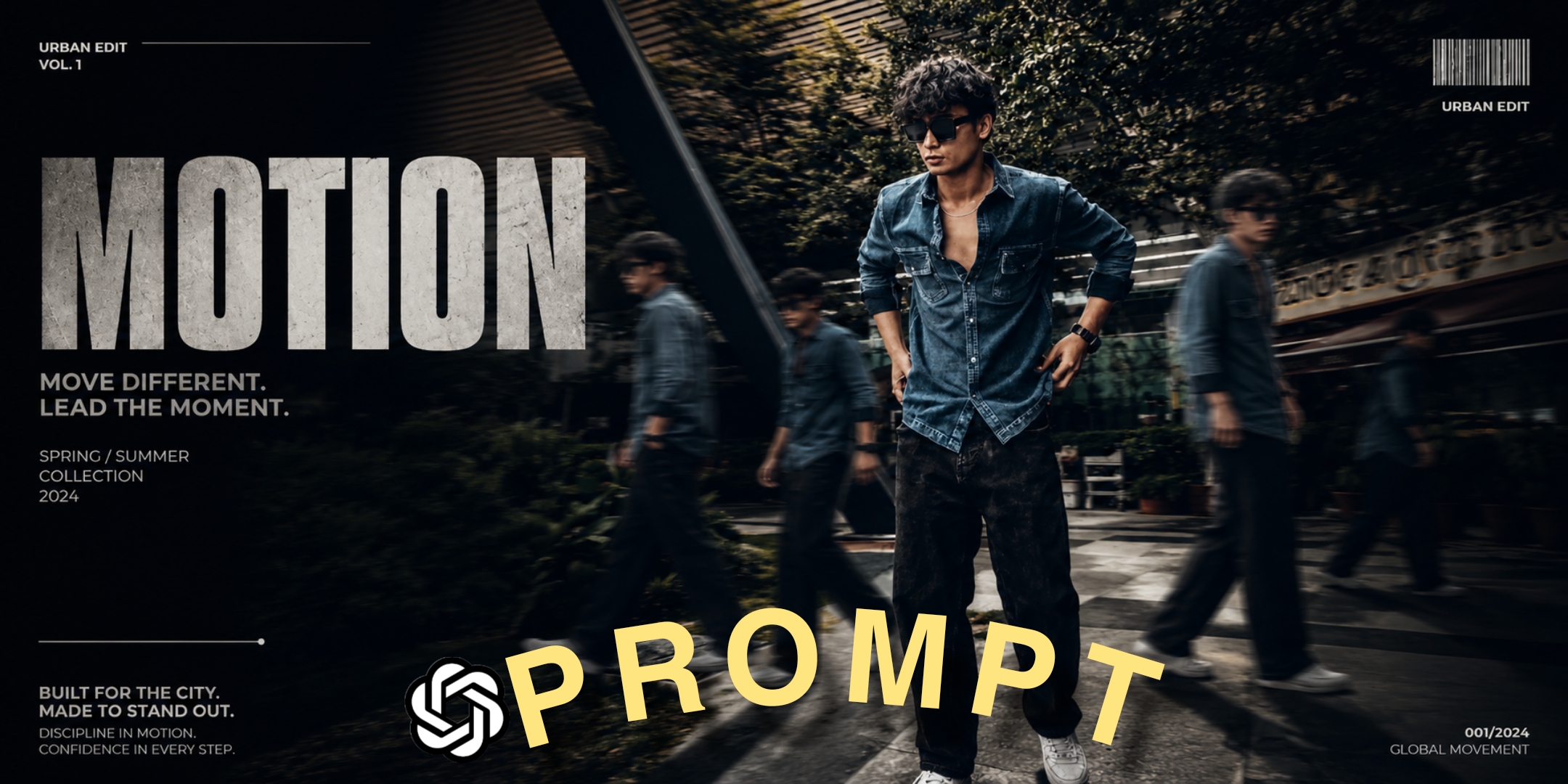
Is trend ka concept bahut hi unique aur premium hai. Isme ek simple photo ko ek high-end, futuristic poster ya editorial campaign mein badal diya jata hai. Main subject (yani aap) center mein bilkul sharp, focused, aur confident pose mein hota hai, jabki background mein aapke hi multiple clones ek strong motion blur effect ke sath aage-peeche move karte hue nazar aate hain. Yeh ek aisi visual storytelling technique hai jo time, speed, aur movement ka ek perfect illusion create karti hai. Viewers jab aisi photo dekhte hain, toh wo automatically apna scroll rokne par majboor ho jate hain.Pehle ke time mein is tarah ka cinematic clone poster banane ke liye ek professional editor ko Photoshop mein ghanton tak masking, layer adjustment, clone stamping, aur heavy color grading karni padti thi. Lekin aaj Artificial Intelligence (AI) aur ChatGPT ki advance capabilities ne game puri tarah se badal diya hai. Aap yahi same studio-level result sirf ek well-crafted text prompt ki madad se kuch hi seconds mein achieve kar sakte hain…
Is detailed article mein, main aapko wo secret aur viral AI prompts dene wala hoon, jinhe use karke aap kisi bhi normal photo ko ek masterpiece mein convert kar sakte hain, bina kisi complex editing software ke.
The Magic Behind AI Cinematic 3D Cloning
Is hack ka main magic kisi software mein nahi, balki aapke text prompt ki detailing mein chhipa hota hai. Jab aap kisi advanced AI image generator tool ka use karte hain, toh aapko AI ko strictly yeh batana hota hai ki original face aur identity ko change nahi karna hai. Hum yahan AI ka use karke sirf background, lighting, aur cloning effects ko manipulate karenge taaki ek
professional editorial look nikal kar aaye. Chaliye dekhte hain wo do sabse powerful aur viral ChatGPT prompts jo aapki simple photos ka pura aesthetic badal denge.
Viral Hack 1: The Outdoor Cinematic Clone Effect
Agar aap chahte hain ki aapki photo ek dark, moody, aur dramatic outdoor location (jaise kisi basketball court) par shoot ki gayi ho aur wo bilkul Nike ya Adidas ki premium ad campaign ki Tarah lage, toh yeh pehla prompt aapke liye ek masterstroke saabit hoga. Isme hum teal-orange cinematic color grading aur strong shadows ka use karenge jo Hollywood movies mein sabse zyada popular hai.
Agar aap chahte hain ki aapki photo ek dark, moody, aur dramatic outdoor location (jaise kisi basketball court) par shoot ki gayi ho aur wo bilkul Nike ya Adidas ki premium ad campaign ki tarah lage, toh yeh pehla prompt aapke liye ek masterstroke saabit hoga. Isme hum teal-orange cinematic color grading aur strong shadows ka use karenge jo Hollywood movies mein sabse zyada popular hai.
Aapko bas kisi bhi AI image generator mein apni ek clear photo upload karni hai aur is prompt ko copy-paste karna hai:
Copy prompt 👇
Use the uploaded image as the main subject, keep face and identity 100% same.Change background to an outdoor basketball court with dark moody clouds and dramatic sky.Add multiple clones of the same person walking around on both sides with strong motion blur effect.Keep main subject sharp and in focus, natural confident pose.Apply cinematic lighting with high contrast, shadows, and teal-orange color grading.Add depth of field, realistic shadows on ground.Style like fashion editorial photography, Nike campaign look.Ultra-realistic, 8K quality
Beginner-Friendly Practical Tips (Hack 1)
● Color Grading Customization: Prompt mein “teal-orange color grading” ka zikr hai. Agaraapko cyberpunk ya neon vibe zyada pasand hai, toh aap is text ko replace karke “neon pink and blue cinematic lighting” likh sakte hain. Result ekdum futuristic aayega.● Location Swapping: Agar aap basketball court nahi chahte, toh “outdoor basketballcourt” ko hata kar “rainy tokyo street at night” ya “abandoned industrial warehouse” likh kar ek naya aesthetic create kar sakte hain.
● Subject Clarity is King: Hamesha aisi base photo upload karein jisme aapka face bilkul samne (front-facing), well-lit, aur clear ho. Isse AI aapki identity ko 100% maintain rakhne mein kamyab hoga.
Viral Hack 2: High-End Streetwear Magazine Poster
Kabhi kabhi sirf ek dark aur moody photo kaafi nahi hoti; aapko ek aisi image chahiye hoti hai jo sidha kisi international fashion magazine (jaise Vogue ya GQ) ke cover page jaisi lage. Agar aap apne Instagram feed ko ek professional influencer ya model ki tarah aesthetic look dena chahte hain, toh typography (text) aur luxury fashion elements ka use karna bahut zaroori hai. Yeh dusra prompt aapki original photo ko directly ek high-end streetwear editorial poster mein transform kar dega:
Copy prompt 👇
Transform my photo into a high-end cinematic streetwear editorial poster. Keep my face, body, pose, outfit, and original background recognizable, but enhance everything into a luxury fashion campaign aesthetic. Add 4 realistic duplicate versions of me across the frame placed naturally like motion-captured walk sequences. Keep the main/front version largest, sharpest, and most detailed, while side clones are slightly faded or motion blurred. Use dramatic overhead lighting with a subtle glow, deep shadows, long floor shadows, cool-toned cinematic color grading, strong contrast, glossy highlights, and soft film grain. Make the outfit textures crisp and premium. Add bold oversized magazine-style typography in the top corner with one powerful word related to movement or style (example:MOTION, STATIC, RUSH, ECHO). Include smaller minimal text such as collection year, slogan, barcode, or campaign details.
Beginner-Friendly Practical Tips (Hack 2)
● Fixing Typography: Is prompt mein AI khud text generate karega (jaise MOTION, RUSH). Kyunki AI abhi bhi text generation mein kabhi-kabhi spelling mistakes kar deta hai, toh agar text ajeeb lage, aap prompt se typography wala hissa hata dein. Image generate hone ke baad use Canva ya PicsArt mein open karein aur custom bold fonts (jaise ‘Bebas Neue’ ya ‘Anton’) ka use karke khud text add karein. Yeh 100% flawless lagega.
● The Power of Film Grain: Prompt mein “soft film grain” detail ka use kiya gaya hai. Yeh choti si detail image ko nakli plastic jaisa lagne se rokti hai aur ek real DSLR camera se kheenchi hui vintage aur premium feel deti hai.
Best AI Image Generators to Execute These Prompts
Ab sawal aata hai ki in prompts ko use kahan karna hai? Market mein bohot saare AI tools hain, lekin “Motion Is Identity” trend ke liye ye teen tools sabse best result dete hain:
1. Midjourney (V6): Agar aapko ultra-realism aur perfect cinematic look chahiye, toh Midjourney ka koi comparison nahi hai. Yeh skin texture aur lighting ko sabse best handle karta hai. Isme aapko apne prompt ke aakhir mein –ar 9:16 lagana chahiye taaki image Instagram reels/stories ke size ki bane.
2. ChatGPT Plus (DALL-E 3): Agar aapke paas ChatGPT Plus hai, toh DALL-E 3 prompt ko accurately samajhne mein master hai. Yeh typography (text) ko Midjourney se zyada behtar tarike se likh sakta hai.
3. Leonardo AI (Best Free Alternative): Agar aap free mein studio-quality images banana chahte hain, toh Leonardo AI ek behtareen platform hai. Iska “PhotoReal” model aapko bilkul Midjourney jaisi high-quality output de sakta hai bina kisi premium subscription ke.
Bonus Content: Turn Your Static AI Image into a Viral Video Reel
Kyunki main ek video editor hoon, main aapko is trend ka ek next-level secret batata hoon. Aapne in prompts se ek kamaal ka poster toh bana liya, par agar aap is image ko video (Reel) mein convert kar dein, toh uske viral hone ke chances 10x badh jayenge. Ise karna bahut aasan hai:
● CapCut 3D Zoom Effect: Apni generated AI image ko CapCut app mein import karein. Image par click karke ‘Style’ option mein jayein aur “3D Zoom Pro” ya “Motion” effect apply karein. Yeh effect image ke background ko peeche push karega aur aapke main character ko aage pop karega, jisse ek mind-blowing 3D parallax effect create hoga.
● Add Sound Design: “Motion Is Identity” aesthetic ke liye audio bohot matter karta hai. Apne video mein ek slow, atmospheric cinematic bass sound ya koi trending slow-reverb lofi beat lagayein. Background mein halki si ‘camera shutter’ ya ‘wind swish’ ki sound effect add karni
Common Mistakes Beginners Should Avoid
Ek professional AI editing aur ek amateur edit mein bohot fark hota hai. Agar aap chahte hain ki
aapki image viral ho aur bilkul premium lage, toh in galtiyon se hamesha bachein:
● Low-Quality / Cluttered Base Image Upload Karna: AI humesha aapki uploaded photo
se data pick karta hai. Agar aapki base photo blur hai, over-exposed hai, ya uske background mein bohot saara distract karne wala kachra (clutter) hai, toh AI ek clean result nahi nikal payega. Hamesha clean background aur achi lighting wali clear photo ka hi use karein.
● Over-complicating The Prompt: Jo prompts maine upar diye hain, wo multiple times test kiye gaye hain. Agar aap unme zabardasti bohot saari non-relatable cheezein add karenge (jaise ‘add flying birds, add random cars, add rain’), toh AI original “Motion Is Identity” ke focus ko bhool jayega aur image bohot fake aur messy lagne lagegi.
● Shadows aur Lighting Ko Ignore Karna: Ek real aur fake photo mein sabse bada visual difference shadows (parchhai) ka hota hai. Humare diye gaye prompts mein “realistic shadows on ground” explicitly added hai, isliye is line ko galti se bhi remove na karein. Without shadow, aapka character hawa mein tairta hua lagega.
Conclusion
“Motion Is Identity” trend aapki ordinary photos ko ek premium luxury brand jaisa look dene ka sabse smart aur fast tarika hai. In powerful AI prompts ka use karke aaj hi apni photos ko transform karein aur inhein 3D effects ke sath Reels mein convert karke apni audience ko impress karein. Keep editing, keep experimenting, aur apne content ko hamesha next level par