

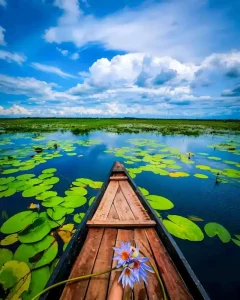
Aaj ke social media ke fast-paced daur mein har din ek naya visual trend viral hota hai. Pichle kuch dino se aapne Instagram Reels, Facebook, aur Pinterest feed par ek bahut hi premium aur cinematic aesthetic dekhi hogi—jahan ek ladka ya ladki kisi khubsurat boat par baithe hote hain, unke haath mein aesthetic flowers hote hain, aur image ki overall quality aisi lagti hai jaise kisi high-end DSLR ya latest iPhone 17 Pro Max se shoot ki gayi ho. Is naye aur aakarshak visual trend ko hi digital duniya mein new trading Boat Aesthetic AI viral chat Gpt prompt photo editing kaha ja raha hai.
Agar aap ek beginner creator hain aur sochte hain ki aisi mind-blowing aur photorealistic images banane ke liye aapko ghanto Photoshop par mehnat karni padegi, toh main aapko bata doon ki yeh bilkul galat hai! Ab yeh sara kaam AI (Artificial Intelligence) tools ke through sirf kuch seconds mein ho jata hai. Is a highly detailed article mein, main aapko wo exact viral AI prompts dunga, unhe highlight karunga, aur sabse zaroori baat—har prompt ko apni zaroorat (intent) ke hisaab se step-by-step customise karne ka poora process bataunga, taaki aapki photos sabse alag aur 100% unique dikhein.
AI Image Generation Ka Process: Ek Quick Aur Easy Guide..
In viral prompts ko use karne se pehle aapko ye samajhna hoga ki inhe exactly kahan aur kaise type karna hai. Aap in photorealistic AI photos ko Bing Image Creator (Microsoft Designer) ya ChatGPT Plus (DALL-E 3) ka use karke bilkul free aur HD quality mein generate kar sakte hain.
Aapko bas mere dwara niche diye gaye highlighted prompts ko copy karna hai aur AI tool ke text box mein paste karna hai. Lekin asli magic tab hota hai jab aap apni requirement ke hisaab se in prompts ke keywords ko change karte hain. Aaiye dekhte hain wo top 3 viral prompts aur unka detailed step-by-step customisation process.
1. The Boy’s Boat Aesthetic Prompt (Ladko Ke Liye Viral Edit)
Yeh pehla prompt un male creators ke liye design kiya gaya hai jo apne liye ek photorealistic, moody, aur highly detailed cinematic shot generate karna chahte hain. Is prompt mein ultrawide camera angles ka bohot smart use kiya gaya hai.
Download Karo Image

VIRAL PROMPT 1: Copy
“Same face, same outfit: ultrawide. Upper-angle low-angle shot by 17 Pro Max ultrawide angle of a young man sitting with his head bowed in the same boat. This boy, who is sitting in a boat, should look photo realistic with two stylish looks. Hand the boy flowers like the ones in the boat-hold them in one hand. And increase the quality. Instagrammable 4:5 ratio“
Is Prompt Ko Step-by-Step Customise Kaise Karein?
Agar aap is prompt ko direct copy-paste karenge toh sabki photo ek jaisi aayegi. Isey apne hisaab se unique banane ke liye niche diye gaye steps follow karein:
Step 1: Character Ki Details Change Karein: Prompt mein jahan “young man” likha hai, use apne anusaar badlein. Example ke liye aap likh sakte hain: “A 22-year-old young man wearing a black oversized t-shirt and silver chain”. Isse AI ko exact kapdo ka style samajh aayega aur photo original lagegi.
Step 2: Pose Aur Emotion Ko Edit Karein: Is prompt mein “head bowed” (sir jhukaya hua) likha hai jo sad ya moody vibe deta hai. Agar aapko ek cool ya happy vibe chahiye, toh is line ko hata kar likhein: “looking directly at the camera with a confident attitude”.
Step 3: Flowers Ko Apni Vibe Ke Anusaar Badlein: “Flowers like the ones in the boat” ki jagah aap specific flowers ka naam daal sakte hain. Jaise: “holding aesthetic dark red roses” ya “holding glowing neon lilies”. Isse photo ka poora colour aesthetic change ho jayega.
Step 4: Camera Angle Fix Karein: Prompt mein ek sath Upper-angle aur low-angle likha hai. Ek perfect shot ke liye aap isme se ek ko select karein. Dhyan rahe, “Cinematic low-angle shot” likhne se boat aur piche ka aasman bahut majestic aur bada dikhta hai.
2. The Girl’s Boat Aesthetic Prompt (Ladkiyon Ke Liye Viral Edit)
Agar aap ek female creator hain ya kisi female model ka photorealistic boat aesthetic edit banana chahte hain, toh yeh prompt aapke liye ek dam perfect aur flawless result nikal kar dega. Isme feminine touch aur nature aesthetic ka bahut achha balance banaya gaya hai.

“Same face, same outfit: ultrawide. Upper-angle low-angle shot of a young person sitting in the same boat. This girl, who is sitting in a boat, should look photo realistic with two stylish looks. Hand the girl flowers like the ones in the boat-hold them in one hand. And increase the quality. Instagrammable 4:5 ratio”
3. The Pro-Max Quality Prompt (High-End iPhone Camera Output)
Yeh tisra prompt thoda aur refined aur technical hai. Isme “17 Pro Max” keyword ko specific jagah par place kiya gaya hai taaki AI engine lens ke wide-angle distortion (jaise iPhone me hota hai) ko accurately mimic kar sake. Isse final image bilkul premium smartphone ya DSLR jaisi lagti hai.
VIRAL PROMPT 3:
“Same face, same outfit: ultrawide. Upper-angle low-angle shot of a young man sitting in the same boat.t This boy, who is sitting in a boat, should look photo realistic with two stylish looks. Hand the boy flowers like the ones in the boat-hold them in one hand. And increase the quality. shot by 17 Pro Max ultrawide angle Instagrammable 4:5 ratio”
Apne AI Photos Ko 100% Unique Aur Original Banane Ka Master Process
AI images sabki ek jaisi na lagein, iske liye Personalisation bohot zaroori hai. Jab aap upar diye gaye customisation steps ke sath apni photo generate kar lein, toh usko apna personal touch dene ke liye yeh advanced process follow karein:
Face Swap Technology Ka Smart Use:
AI hamesha ek random chehra (fake face) banata hai. Apni khud ki original photorealistic editing banane ke liye, AI image generate hone ke baad use HD mein download karein. Iske baad kisi free AI Face Swap tool (jaise Remini app, Reface app, ya Discord ka InsightFace bot) ka use karein. In apps mein apni ek clear selfie upload karein aur us AI character ke chehre par apna asli chehra swap (replace) kar dein. Yahi wo real editing secret hai jisse aapki AI photo 100% authentic aur original lagti hai, aur aapke followers hairan reh jayenge!
Bonus Tip: AI Image Ko Real Aur Cinematic ‘Lightroom’ Touch Kaise Dein?
Sirf text prompt type karke AI se image generate karna aadhi editing hai. Ek professional level ka final output nikalne ke liye aapko un photos ko “Real aur Cinematic” dikhana aana chahiye.
Jab aapki image generate ho jaye aur aap apna face swap kar lein, toh final magic ke liye us photo ko apne phone ke Adobe Lightroom Mobile app mein open karein.
Texture aur Grain: AI images aksar bohot zyada smooth aur fake “plastic” jaisi lagti hain. Ise real, camera-clicked photo banane ke liye Lightroom ke Effects panel mein jaakar image par thoda sa ‘Grain’ (lagbhag 15-20%) aur thoda sa ‘Texture’ add karein.
Lighting Adjustments: Light panel mein jaakar Shadows ko thoda kam karein aur Contrast ko halka sa badha dein taaki image mein depth aaye.
Colour Pop: Colour panel mein Vibrance ko badhayein taaki boat aur flowers ke colours pop hoke bahar aayein.
Yeh chhota sa Lightroom tweak aapki AI image ko ek aisi premium cinematic look dega ki koi professional editor bhi nahi pakad payega ki yeh originally artificially generate ki gayi hai!
Conclusion
Dosto, photo editing aur content creation ki duniya ab puri tarah se AI ke sath evolve ho chuki hai. Yeh trending new trading Boat Aesthetic AI viral chat Gpt prompt photo editing aapki feed ko premium look dene aur naye followers attract karne ka sabse asaan aur fast tareeka hai. Yaad rakhiye, sirf prompt ko copy-paste karne se magic nahi hoga; asli creativity tab bahar aati hai jab aap mere bataye gaye step-by-step process ko follow karke keywords ko apni intent ke hisaab secustomisee karte hain, aur Lightroom mein use apna final touch dete hain. Aaj hi in prompts ko try karein, apna face swap karein, aur is viral trend ka hissa banein. Apni creativity ko explore karte rahiye aur apne editing skills ko roz upgrade karein!