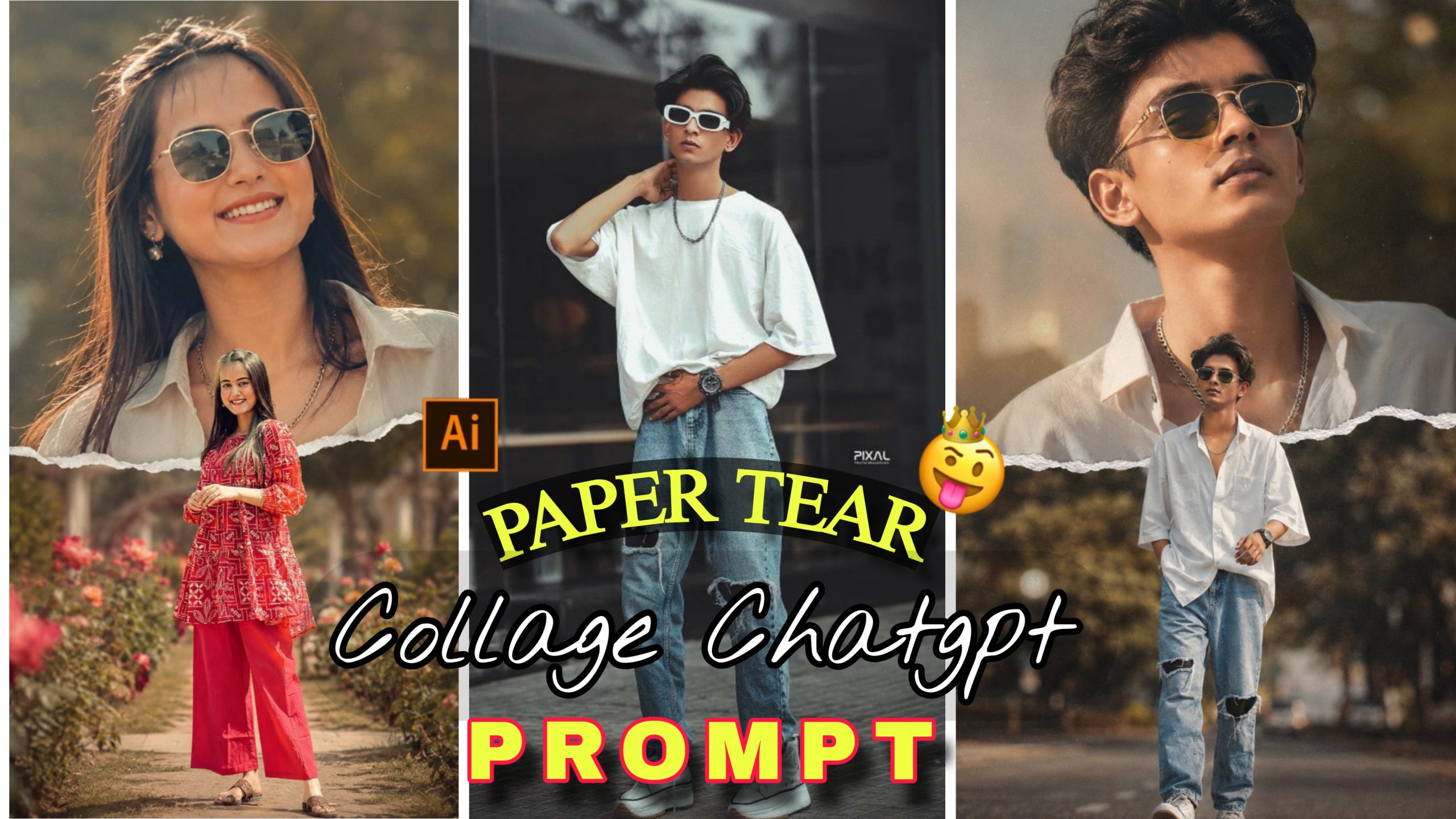
Aaj kal social media par, chahe wo Instagram Reels ho ya Pinterest, trending aur viral photos ka ek alag hi craze chal raha hai. Agar aap bhi apne simple se photo ko ek premium, luxury artistic look dena chahte hain, toh ab aapko ghanton tak Photoshop ya Lightroom par mehnat karne ki koi zaroorat nahi hai. Technology itni fast ho chuki hai ki aap Paper Tear Collage chat Gpt viral prompt Photo Editing ke zariye bilkul professional magazine-level ke photos taiyar kar sakte hain.
Pehle jo complex layers, intricate masking aur backdrops set karne mein hazaron rupaye aur ghanton ka samay lagta aaj wo kaam AI prompts ki madad se seconds mein ho jata hai. Is detailed guide mein, hum baat karenge ki kaise aap sirf ek click mein viral double exposure art generate kar sakte hain, kaun se prompts is waqt internet par dhoom macha rahe hain, aur unhe sahi tarike se customise karne ka exact tarika kya hai.
AI Paper Tear Collage Photo Editing Kya Hai aur Yeh Viral Kyun Ho Raha Hai?
Jab hum kisi professional design studio ki baat karte hain, toh wahan double exposure photography aur mixed media scrapbooking ka use kiya jata hai. AI (Artificial Intelligence) ne isi poore physical aesthetic ko ek digital algorithm mein convert kar diya hai.
Jab aap Chat GPT ya kisi advance AI tool par ek specific aur detailed text description (jise hum prompt kehte hain) likhte hain, toh AI use analyse karke ek hyper-realistic image generate karta hai. Is trend ke viral hone ka sabse bada karan yeh hai ki iska output dekh kar koi bhi yeh nahi keh sakta ki ise kisi aam software se banaya gaya hai. Yeh digital content creators, freelancers, aur social media enthusiasts ke liye ek game-changer visual styling tool ban chuka hai jo aapki post par audience ka retention badha deta hai.
Ready-To-Use Viral AI Prompts (Copy & Paste)
🔴 PROMPT 1: FOR BOYS (CINEMATIC ROAD WALK LOOK)
A high-quality cinematic double exposure and paper-tear collage. The background features a large, ethereal close-up portrait of a young indian boy with dark hair, wearing a shirt with the top button open, and jeans stylish gold-rimmed sunglasses, looking up with a soft smile. A realistic white torn-paper edge creates a horizontal divide across the centre. In the foreground, the same man is shown in a full-body shot, walking confidently like a hero on the road, and in real height, ratio 3:4.”
PROMPT 2: FOR GIRLS (ELEGANT GARDEN LOOK)
“A high-quality cinematic double exposure and paper-tear collage. The background features a large, ethereal close-up portrait of a young indian Woman with dark hair, wearing a shirt top button open, and jeans, stylish gold-rimmed sunglasses, looking up with a soft smile. A realistic white torn-paper edge creates a horizontal divide across the centre. In the foreground, the same woman is shown in a full-body shot, walking confidently like a heroine on Garden, and in real height, ratio 3:4.”
Note: Agar aap face swap feature ka use kar rahe hain, toh “keep face 100% same as reference” text ya reference image mode aapko apna khud ka original face blend karne mein bohot madad karega.
AI Prompt Ko Customise Kaise Kare: Step-by-Step Process
Diye gaye prompts ko aap apne hissab se badal kar ek naya aur unique look generate kar sakte hain. Prompt customisation seekhna bohot zaroori hai taaki aapki har photo sabse alag aur fresh dikhe. Iske liye niche diye gaye steps ko follow karein:
Step 1: Background and Theme Location Badlein
Agar aapko road ya garden ke bajaye koi aur backdrop chahiye, toh prompt mein jahan on road ya on Garden likha hai, wahan aap apni pasand ka scene daal sakte hain. Jaise: on a neon-lit cyberpunk street, luxury vintage library background, ya misty mountain trail.
Step 2: Outfit aur Dressing Style Change Karein
Apne character ko alag look dene ke liye kapde badlein. Prompt mein likhe shirt top button open, and jeans ko hata kar aap premium black leather jacket, traditional ethnic kurta, oversize streetwear hoodie, ya sharp formal blazer likh sakte hain.
Step 3: Accessories and Eyewear Modify Karein
Character ke styles ko enhance karne ke liye stylish gold-rimmed sunglasses ki jagah aap retro aviator glasses, silver chain pendant, vintage round specs, ya premium modern watch ka istemal kar sakte hain.
Step 4: Expressions aur Subject Mood Customise Karein
Photo ke overall emotions ko badalna bohot aasan hai. Prompt ke main body mein diye gaye looking upside down with a soft smile ko badal kar aap looking directly into the camera with an intense confident look, serious cinematic expression, ya mysterious look likh sakte hain.
Step 5: Paper Tear Edge Texture Ko Customise Karein
Agar aap standard white look nahi chahte, toh aap realistic white torn-paper edge ko modify karke vintage burnt paper edges, neon glowing ripped borders, ya ancient scroll torn texture likh sakte hain jisse photo ko ek completely naya artistic layout milega.
Understanding The Design Layout: Multi-Exposure Magic
Agar aap is prompt ke structure ko dhyan se dekhenge, toh yeh teen bade design rules par kaam karta hai jo is photo ko viral banate hain:
The Ethereal Backdrop (Symmetry): Background ka close-up portrait humesha low opacity ya faded format mein generate hota hai jo photo ko ek dreamy aura deta hai.
The Sharp Foreground (Focus): Saara contrast aur depth foreground ke full-body action pose par hoti hai jo subject ki personality ko real height ke sath define karti hai.
The Organic Separator (Texture): Jo realistic torn-paper effect hai, wo do alag-alag framing angles ko aapas mein merge karne ka kaam karta hai taaki collage khichdi na lage.
Bonus Tip: Colour Grading & Overlay Magic
AI image generate karne ke baad agar aap usme thoda sa human touch dena chahte hain, toh hamesha ek Colour Grading Overlay ka use karein.
Photo ko kisi bhi editing application mein le jaakar thoda sa Lens Grain (around 2-4%) add karein. Isse AI ka jo perfect plastic ya smooth gloss look hota hai, wo khatam ho jata hai aur photo mein ek genuine analogue film texture aa jata hai. Sath hi, shadows ko halka sa fade karke warm ya cool tint ka balance banayein taaki skin tones bilkul natural aur lively lagne lagein.
Common Mistakes Beginners Should Avoid
Agar aap professional aur AdSense-friendly high-quality output chahte hain, toh in aam galtiyon se bachein jo aksar shuruaat mein log karte hain:
Over-Optimising Prompt Keywords: Ek hi prompt ke andar bohot saare conflicting clothing styles ya multiply locations mat likhiye. Agar aap AI ko confuse karenge, toh background aur foreground aapas mein messy tarike se overlap ho jayenge.
Ignoring Aspect Ratio Specifications: Jab bhi aap trending reels, vertical posts ya pins ke liye image bana rahe hain, toh prompt ke end mein ratio 3:4 ya ratio 9:16 likhna na bhoolein, warna AI default square ratio de dega jo look ko kharab kar sakta hai.
Mismatched Lighting in Face Swap: Agar aap is portrait par apna face lagane wale hain, toh dhyan rakhein ki aapki original image ki lighting aur angle bhi usi downward/upward slope mein ho jo prompt mein generated hai, nahi toh light direction fake dikhegi.
Conclusion
Paper Tear Collage chat GPT viral prompt Photo Editing aaj ke samay mein unique aur high-quality aesthetic content create karne ka sabse fast aur artistic tarika hai. Sahi prompts aur step-by-step customisation techniques ka combination use karke aap aise visuals bana sakte hain jo pehle sirf professional graphic designers hi bana paate the. Galtiyon se bachein, naye elements aur background variations ke sath experiment karte rahein, aur apni creative editing skills ko lagatar behtar banayein.