
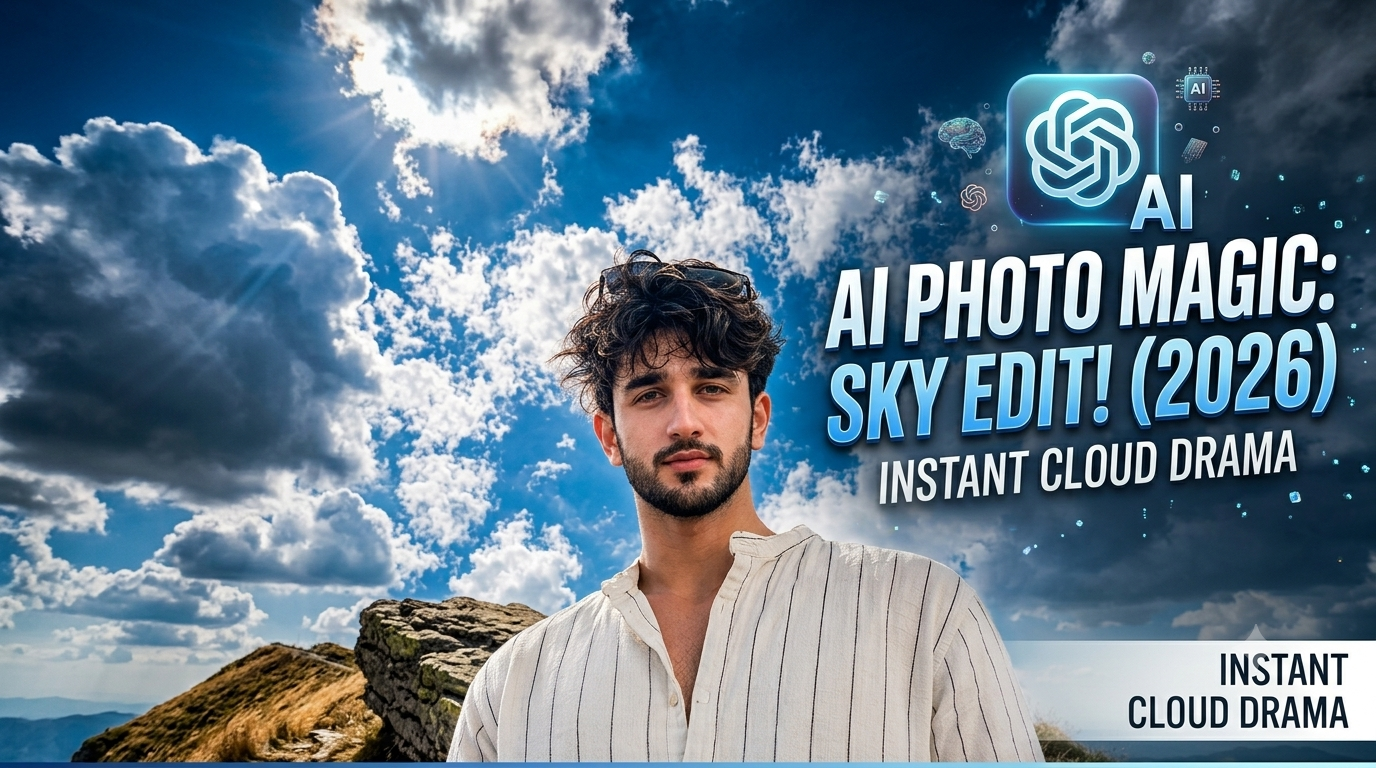
Gautam Rai ek professional video editor hai jinke paas editing industry ka 5 saal ka solid experience hai. Vo YouTube par 5,000 subscribers aur Instagram par 1,40,000 followers ki community ke sath regularly trending editing techniques, CapCut presets, aur professional workflow share karte hain. Is blog ke zariye unka main goal beginners ko genuine, high-quality, aur practical editing skills bilkul free mein sikhana hai.
Aajkal social media platforms jaise Instagram, Pinterest aur YouTube Shorts par dramatic sky backgrounds, soft natural sunlight, aur volumetric cloud lighting wale AI photorealistic visual portraits kafi viral ho rahe hain. Sabhi creators aur editors is trend ko follow karke apni photos ko cinematic look de rahe hain.
Lekin jab hum AI tools se photorealistic images generate karne ki koshish karte hain, toh mostly sabse badi problem face inconsistency, unnatural skin texture, plastic shine, aur fake studio lighting ki aati hai.
Agar aap bhi Google par Ultra Realistic Cloudy And Sunlight Photo Prompt search kar rahe hain, toh aap bilkul sahi jagah par aaye hain. Is detailed guide mein hum samjhenge ki yeh style trending mein kyun hai, yeh aakhir kya hai, aur kaise aap ChatGPT aur Google Gemini ka use karke apne actual face photo ke saath exact character identity copy karke high-quality photos generate kar sakte hain.
Ultra Realistic Cloudy And Sunlight Photo Kya Hai Aur Yeh Trending Mein Kyun Hai?
1. Ultra Realistic Cloudy And Sunlight Style Kya Hai?
Is photo style mein lighting aur backdrop ka ek unique visual balance hota hai. Isme character ke peeche 80–90% frame mein deep-blue sky aur fluffy white cumulus clouds hote hain, jabki top se ek bright midday sun glowing lighting produce karta hai. Sunlight clouds ke beech se diffuse hokar character par padti hai, jisse skin par soft golden highlights, natural dynamic shadows, aur volumetric rim lighting ka 3D effect banta hai.
2. Yeh Style Social Media Par Trending Mein Kyun Hai?
Cinematic Aesthetic: High-end DSLR camera lenses (jaise 85mm portrait ya 14mm wide angle) ki tarah low-angle shot look deta hai, jo look wise kaafi premium lagta hai.
High Engagement & Virality: Instagram Reels aur Pinterest par cloudy sky aesthetics aur warm sunlight photography users ka attention immediately grab kar leti hai, jisse impression aur reach fast milti hai.
Easy Face Match Customisation: AI generators mein apni photo upload karke exact face, skin tone aur identity replace karna ab bohot aasan ho gaya hai, jisse har koi bina kisi heavy camera set up ke photoshoot quality images banakar upload kar raha hai.
Step-by-Step Guide: ChatGPT Aur Gemini Mein Target Image Kaise Upload Karein
Kisi bhi AI tool mein exact face identity match karwane ke liye aapko reference image process ko proper steps ke sath execute karna hota hai
Method 1: Google Gemini Ke Saath Image Generation Process
Sabse pehle Google Gemini open karein aur apne account se login karein.
Prompt input bar ke paas bane + (Plus / Image Attach) icon par click karein aur apni clear face photo upload karein (Dhayan rahe photo mein lighting natural ho aur face par koi heavy filter na ho).
Text box mein neeche diye gaye prompts mein se apna pasandida prompt copy karke paste karein.
Text ke aage yeh line zaroor add karein: “Reference the face, hair texture, and identity from the attached image strictly without modifying facial structure.”
Generate par click karein. Agar result 100% face match na kare, toh Regenerate button par tap karke prompt adjustments karein.
Method 2: ChatGPT Ke Saath Process
ChatGPT open karein.
Attachment button par click karke apni high-resolution face photo upload karein.
Niche diye gaye specific prompt ko paste karein. Prompt execute karne ke baad ChatGPT aapki uploaded photo ke facial characteristics ko analysing frame ke roop mein use karke exact composition generate karega.
Top 3 Copy-Paste Ultra Realistic Prompts
Yeh teeno prompts specifically Ultra Realistic Cloudy And Sunlight Photo Prompt key concepts ko mind mein rakhkar draft kiye gaye hain. Aap inhen direct copy karke use kar sakte hain.
Prompt 1: Female Dramatic 85mm Sunlight Portrait (Close-Up Shot)
Prompt:-
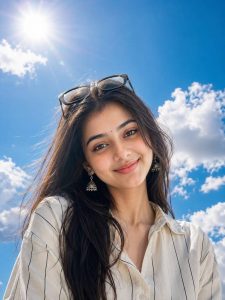
Ultra-realistic close-up portrait of the SAME young South Asian woman from the uploaded image, captured from a dramatic low-angle perspective using an 85mm DSLR portrait lens. Maintain 100% the same face, identity, facial features, skin tone, eye shape, nose, lips, hairstyle, and proportions as the uploaded photo. She is looking directly into the camera with a calm, confident expression and a soft natural smile. Her thick dark hair flows naturally in the breeze with a few loose strands framing her face. Black sunglasses rest naturally on top of her head. She is wearing a loose cream-white linen shirt with thin black vertical stripes, collar slightly unbuttoned, with only the upper chest and shoulders visible. The background MUST be dominated by a vast vibrant deep-blue sky covering approximately 80–90% of the frame, filled with large fluffy white cumulus clouds. The horizon should be placed very low in the composition so that almost the entire background is open sky. A bright glowing midday sun appears in th
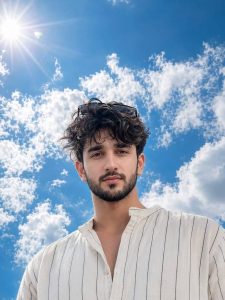
Ultra-realistic close-up portrait of the SAME young South Asian man from the uploaded image, captured from a dramatic low-angle perspective using an 85mm DSLR portrait lens. Maintain 100% the same face, identity, facial features, skin tone, eye shape, nose, lips, hairstyle, beard (if present), and proportions as the uploaded photo. He is looking directly into the camera with a calm, confident expression and a soft natural smile. His thick dark hair moves naturally in the breeze with a few loose strands adding realism. Black sunglasses rest naturally on top of his head. He is wearing a loose cream-white linen shirt with thin black vertical stripes, collar slightly unbuttoned, with only the upper chest and shoulders visible. The background MUST be dominated by a vast vibrant deep-blue sky covering approximately 80–90% of the frame, filled with large fluffy white cumulus clouds. The horizon should be placed very low in the composition so that almost the entire background is open sky. A bright glowing midday sun

Ultra-realistic full-body portrait of the SAME young South Asian woman captured from an extreme low-angle, ultra-wide (14mm lens) perspective, as if the camera is placed on the ground directly beneath her. She is standing confidently above the camera with one foot slightly forward, both hands casually tucked into her trouser pockets, looking directly into the lens with a calm, confident expression. Maintain 100% the same face and identity as the uploaded photo with no changes to facial features, skin tone, or proportions. She has thick, naturally wavy black hair flowing freely, medium-brown skin, and black sunglasses resting on top of her head. She wears a loose cream-white linen shirt with thin black vertical stripes, sleeves rolled up to the forearms, the collar slightly unbuttoned, paired with oversized cream-white linen trousers and clean white sneakers with highly detailed soles visible due to the dramatic perspective. The left shoe dominates the foreground because of the extreme wide-angle lens distorti
Color Grading & Post-Processing Step-By-Step (Quality Enhancement)
AI image generation ke baad 100% camera-grade realistic outcome paane ke liye mobile editing apps (Lightroom Mobile, Lightroom CC, ya Snapseed) mein post colour grading sabse critical step hota hai
.Step 1: Exposure & Light Adjustments
Photo ko Lightroom Mobile app mein import karein.
Light Menu mein jaakar Highlights ko -15 to -20 reduce karein (is-se sky aur white clouds ke overexposed details wapas aayenge). Shadows ko +10 to +15 increase karein taaki face shadows soften ho jayein. Whites ko -10 aur Blacks ko +5 set karein crisp contrast ke liye.
Step 2: HSL Colour Panel (Sky & Skin Tone Balancing)
Color Tool open karke Mix (HSL) tab par click karein.
Blue Colour: Saturation ko +15 to +25 badhayein aur Luminance ko -10 karein taaki sky ka deep-blue look highlight ho.
OrangeColourr (Skin Tone): Saturation ko -8 to -12 karein aur Luminance ko +8 karein. Is-se skin tone natural, bright aur realistic dikhegi (unnatural yellow glow khatam hoga).
Step 3: Texture, Clarity & Film Grain
Effects Panel mein jaakar Dehaze ko +8 karein (sky haze clear hoga).
Clarity ko +5 par rakhein. (Ziada clarity karne se skin fake ya plastic ho sakti hai).
Grain Tool: Add +10 Film Grain. AI images excessive smooth hoti hain; subtle grain add karne se image 100% real DSLR capture lagti hai.
Bonus Tip: Workflow Improvement Trick
Pro Editing Secret: AI images ka plastic look hatane ke liye hamesha Lightroom Noise Reduction panel mein jaakar Colour Noise Reduction ko 15-20% par rakhein aur post-editing mein Soft Warm Vignette (-5) add karein. Is-se lens focus directly face ke centre par locked ho jata hai aur image background se natural tareeqe se separate lagti hai.
Conclusion
Sahi Ultra Realistic Cloudy And Sunlight Photo Prompt aur step-by-step colour grading workflow ke saath aap bina kisi expensive camera setup ke high-end visual aesthetics create kar sakte hain. In prompts ko ChatGPT aur Google Gemini par test karein aur Lightroom Colour Mix tricks se apni photos ko professional finish dein. Consistent practice hi aapki editing skills ko next level par le jayegi.