Social media par aajkal aisi videos bohot viral ho rahi hain jahan ek normal photo achanak se ek behtareen cinematic video mein badal jaati hai. Log aisi videos ko dekh kar hairan ho jaate hain ki aakhir bina kisi bade camera ya heavy computer ke aisi AI Couple Transformation kaise ho gayi. Agar aapko editing ka ‘E’ bhi nahi aata, toh pareshan hone ki bilkul zaroorat nahi hai. 2026 mein video banana itna asan ho chuka hai ki aap bina kisi professional skill ke bhi, sirf mobile ka use karke internet-breaking videos bana sakte hain. Aaj is bilkul simple aur beginner-friendly guide mein hum seekhenge ki kaise aap AI Flow Video Editing Tutorial 2026 | One Click Viral AI Couple Transformation ki madad se apni khud ki viral video taiyar kar sakte hain.
Google Flow AI Kya Hai? (Bilkul Asan Shabdon Mein)
Sabse pehle samajhte hain ki yeh tool kya hai. [suspicious link removed] Google ka ek bilkul naya aur muft (free) platform hai jo internet par chalta hai. Iska kaam hai aapki kisi bhi simple photo ko ek chalti-phirti real video mein badal dena.Ek beginner ke liye yeh kyun best hai?
No Editing Skill Required: Aapko bade software jaise Premiere Pro ya After Effects seekhne ki koi zaroorat nahi hai.
One-Click Magic: Bas photo upload karni hai, text likhna hai, aur aapki video taiyar.
Real Look: Yeh normal cartoonish filters jaisa nahi hota. Isme kapde, baal, aur background bilkul asli video jaise move karte hain.
Ekdum Shuruat Se Seekhein: Google Flow Se Video Kaise Banayein?
Agar aapne zindagi mein pehle kabhi AI tool use nahi kiya hai, toh niche diye gaye steps ko ek-ek karke follow karein…
Step 1: Website Par Jaayein (Open the Studio)
Sabse pehle apne mobile ya laptop ke Chrome browser ko open karein. Wahan aapko [suspicious link removed] ke official dashboard par jaana hai. Apni Gmail id se log in kar lijiye, aapka dashboard turant khul jayega.
Step 2: Apni Photo Upload Karein
Dashboard par aapko ek Upload ya Image ka option dikhega. Us par click karein aur gallery se apni koi bhi pasandida couple photo select kar lein. Dhyan rahe, photo jitni saaf aur achhi lighting wali hogi, AI video utni hi sundar banayega.
Step 3: Magic Words (Prompt) Copy-Paste Karein
AI ko samajhane ke liye ki video mein kya karna hai, hume use kuch likh kar batana padta hai. Ise hum Prompt kehte hain. Aapko apna dimage lagane ki zaroorat nahi hai, bas niche diye gaye Positive Prompt ko poora copy karke wahan ke text box mein paste kar dijiye:

The camera performs a slow, smooth 180-degree cinematic orbital movement around the couple in a continuous arc from behind the boy’s left shoulder to behind his right shoulder. The movement is steady, natural, and perfectly stabilized with realistic parallax. Keep the distance between camera and subjects constant. No zoom, no push-in, no pull-out, no tilt, no sudden pan, and no abrupt angle changes. Throughout the movement, the boy gently holds the girl’s cheek while their foreheads remain touching. They maintain soft romantic eye contact with subtle breathing, natural blinking, slight head movement, and gentle emotional expressions. Hair and saree pallu move naturally in the breeze. Preserve the exact rooftop location, brick wall, plants, telecom tower, sky, lighting, framing, and atmosphere. Ultra-realistic South Indian cinematic romance. Seamless frame-to-frame interpolation, smooth motion, perfect identity preservation, high facial fidelity, realistic cloth physics, natural skin details, cinematic depth of field. Negative Prompt: No face morphing, no identity drift, no outfit change, no background change, no hand deformation, no extra fingers, no extra people, no body distortion, no Al flicker, no jitter, no camera shake, no teleportation, no sudden speed changes, no zoom, no crop, no lighting changes, no unrealistic motion, no frame inconsistency.

Cinematic video showing a young man sitting alone on a rock in a peaceful outdoor setting. After a few seconds, a beautiful young Indian woman in an elegant saree gently walks into the frame, sits down next to him, and looks at the man with a deep, loving smile, radiating a sweet love story vibe. Natural body movement, soft lighting, and seamless motion.”

A young South Asian man stands on an open rooftop near a weathered peach-pink wall during golden hour. He is wearing a dark polo shirt and looking down initialally, then turns to look sideways. Suddenly, an attractive young South Asian woman appears standing back-to-back next to him against the wall. She has long, wavy dark hair blowing gently in the wind and wears an elegant sky-blue embroidered ethnic outfit with dangling earrings. Action and Interaction: The man turns to gaze softly at the woman. He gently reaches out with his hand and tucks a loose strand of hair behind her ear. She smiles subtly, looking downward with a soft, romantic expression as the wind catches her hair. Environment and Lighting: Setting: Outdoor rooftop background featuring a clear blue sky, distant trees, and low building walls. Lighting: Warm golden hour sunlight illuminating the scene with soft highlights and warm tones. Camera: Medium shot, static angle focusing on the two subjects from the waist up. Atmosphere: Romantic,
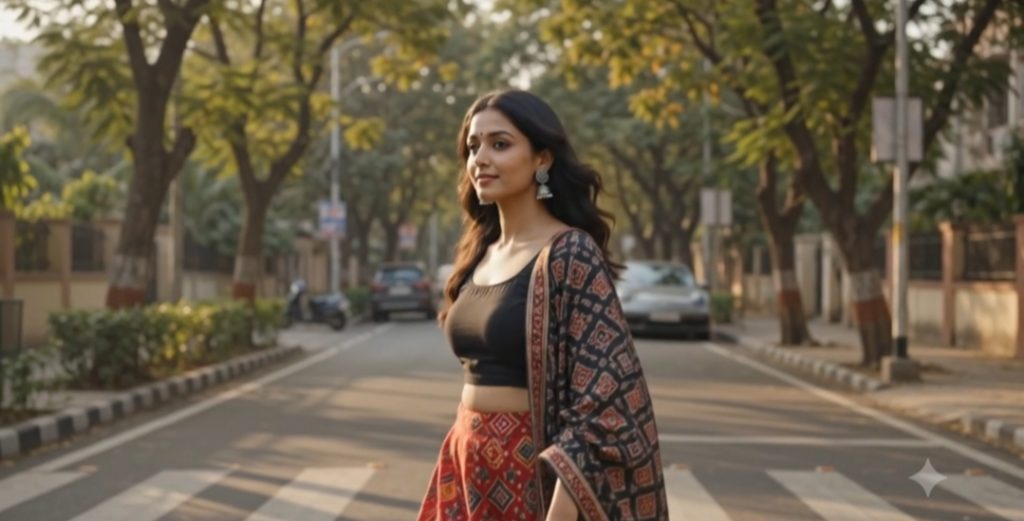
AI Image Generation Prompt Prompt: A split/dual perspective aesthetic photo set on a tree-lined city street with warm sunlight filtering through the canopy. First Character (Man): A young South Asian man wearing round wire-rimmed glasses, a dark brown button-down shirt over a white inner shirt, and off-white relaxed trousers. He is leaning coolly against a sleek dark motorcycle parked on the roadside, with a luxury sports car (Porsche) blurred in the background. Close-up: Expressive eyes with a reflective, thoughtful gaze. Second Character (Woman): A young South Asian woman walking gracefully across a pedestrian zebra crossing. She is dressed in an elegant ethnic outfit featuring a black top, a vibrant red patterned skirt/saree with traditional geometric motifs, and a dark patterned dupatta draped over her shoulder. She wears silver statement jhumka earrings, a small bindi, and has her dark wavy hair flowing naturally. Close-up: Soft, emotive eye contact looking toward the camera. Style & Atmosphere: Cinematic 35mm film photography, natural golden hour lighting, shallow depth of field with soft bokeh, candid and emotional storybook vibe, rich color tones, highly detailed texture.