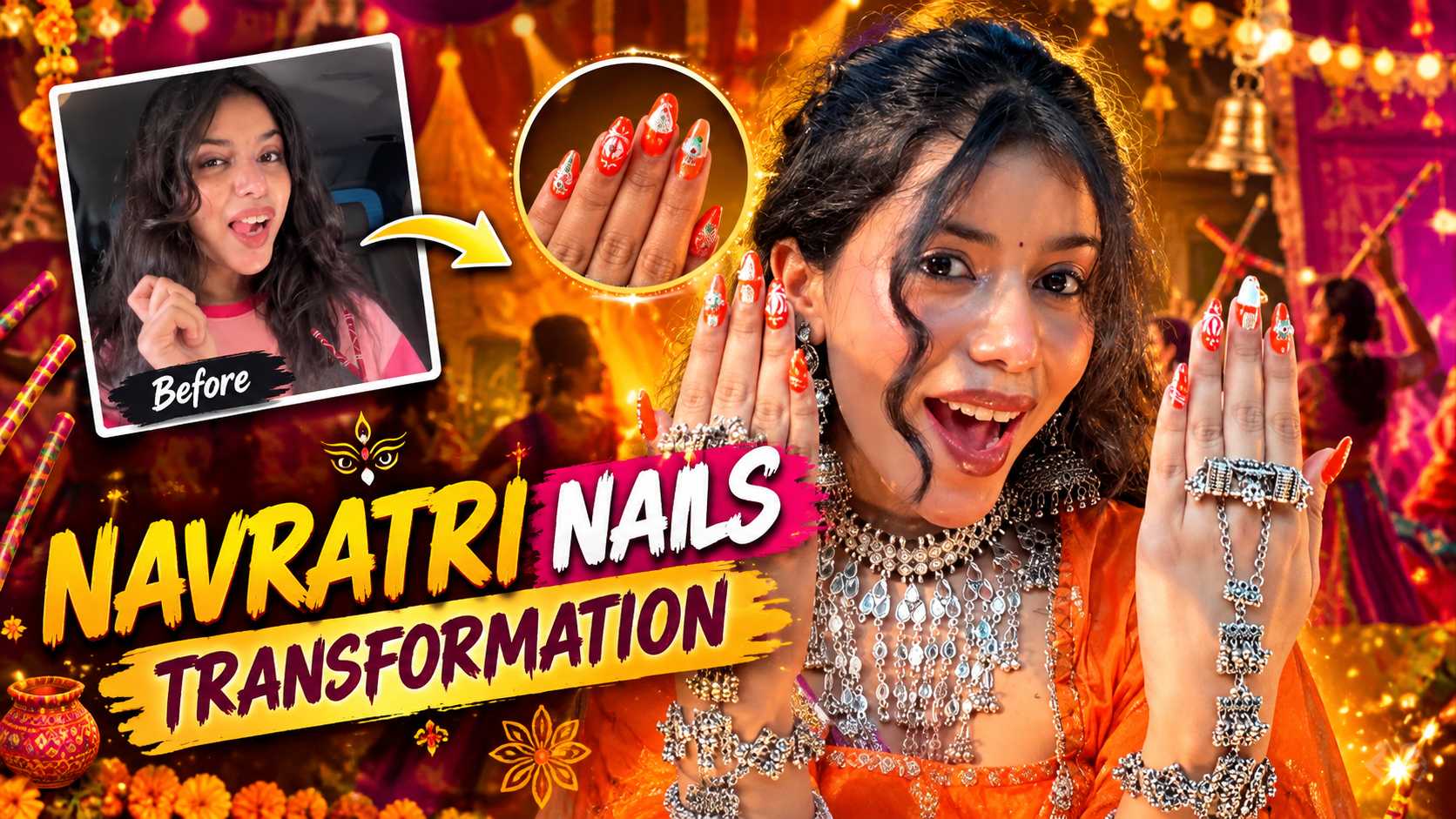
Navratri Dandiya Nails Transformation AI Video Editing: Complete Guide
Navratri ka season aate hi social media par vibrant garba reels, colourful chaniya choli aur traditional festive looks ki dhoom mach jaati hai. Har creator kuch naya aur eye-catching present karna chahta hai taaki unka video feed par instantly stand out kare. Pichle kuch hafton mein Instagram Reels aur YouTube Shorts par ek unique creative trend bohot tezi se viral ho raha hai: Navratri Dandiya Nails Transformation AI Video Editing.
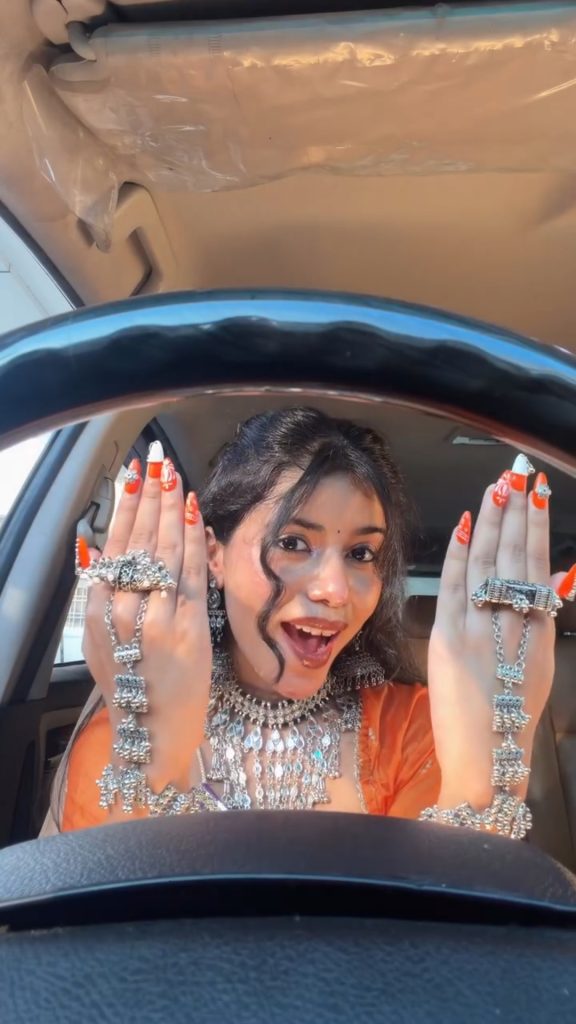
Is trend mein creator pehle casual look mein gaadi ke steering wheel ko pakadte hue normal pose karta hai, aur beat drop ya transition hote hi uske nails, jewellery, heavy traditional oxidised bangles aur festive attire ek cinematic high-fashion garba style mein transform ho jate hain. Pehle is tarah ke visual effects create karne ke liye advanced CGI software, 3D tracking aur ghanto ki manual keyframing lagti thi. Ab advanced generative video AI models ki madad se ye kaam bina kisi technical editing background ke kuch hi minutes mein realistic output ke sath complete ho jata hai.
Yahan hum detail mein samjhenge ki Navratri Dandiya Nails Transformation AI Video Editing trend kya hai, iske peeche ka viral visual formula kaise kaam karta hai, aur kaise aap single photo aur specific AI prompt ka use karke ultra-realistic transformation video render kar sakte hain.
Navratri Nail Art Viral Video Trend: Concept Aur Visual Breakdown
Social media algorithms hamesha un videos ko prioritise karte hain jinka retention rate high hota hai aur jinme unexpected visual punch dekhne ko milta hai. Ye Navratri Dandiya Nails Transformation AI Video Editing format isi visual psychology par design kiya gaya hai.
Is format mein do contrasting visual worlds ko merge kiya jata hai:
- The Casual Setup: Opening shot bilkul raw, relatable aur daily-life environment ka hota hai—jaise car ke andar baithkar steering wheel par dono hath rakhna. Is samay nails bare ya simple hote hain, aur outfits casual t-shirt ya daily wear hote hain.
- The High-Impact Festive Snap: Jaise hi traditional dandiya music ka transition kick hota hai, hath wahi steering wheel par rehte hain, lekin nails par intricate Navratri dandiya nail art, vibrant bandhani patterns, dangling jhumki charms, ghungroo rings aur heavy layered silver cuffs automatically appear ho jate hain. Face par festive glow, maang tikka, nose pin aur traditional chaniya choli reflect hone lagti hai.
Ye dynamic jump audience ka retention instantly hook karta hai kyunki hath ki position aur environment same rehne ke bavjood details 100% switch ho jati hain.
Step 1: Base Photo Capture Karne Ka Sahi Tarika
AI video generation ki quality direct depend karti hai aapke input photo ke angle, lighting aur hand positioning par. Agar input image weak hogi toh AI hands aur fingers ko distort kar dega. Flawless Navratri Dandiya Nails Transformation AI Video Editing ke liye photoshoot karte waqt in steps ko follow karein:
- Car Steering Wheel Grip: Gaadi ki driver seat par baithein aur dono hathon ko steering wheel ke top rim par aage ki taraf fold karke rakhein, jaisa reference video ke opening frame mein dikhta hai. Ungliyan aage ki taraf naturally visible honi chahiye.
- Natural Diffused Lighting: Daylight mein shoot karein, prefer karein morning ya golden hour jab car windshield se soft, natural light aapke face aur hathon par directly pad rahi ho. Harsh shadows se bachein.
- Clear Face & Hand Separation: Camera vertical format (9:16 aspect ratio) mein rakhein. Aapka face steering wheel ke thik upar clean framing mein visible hona chahiye, bina ungliyon se dhake hue.
- Zero Motion Blur: Photo sharp honi chahiye. Focus lock hathon aur chehre ke beech set karein taaki nails aur skin textures sharp capture hon.
Step 2: Google AI Flow Platform Par Video Generate Karne Ka Process
Jab aapki crisp reference photo ready ho jaye, agla step hai generation pipeline setup karna. Google AI environment high-fidelity temporal consistency provide karta hai, jisse moving frames mein face aur fingers natural lagte hain.
- Apne web browser mein Google AI Flow workspace open karein aur login karein.
- Naye video project creation tab par jayein aur apna captured base photo upload karein.
- Aspect ratio ko strictly 9:16 vertical select karein taaki output Instagram Reels aur YouTube Shorts ke liye native resolution maintain kare.
- Prompt box mein transformation prompt enter karein jo exact blueprint transitions ko instruct karta ho.
The Official AI Video Transformation Prompt
AI engine ko exact reference movements replicate karne ke liye structured, detailed prompt ki zarurat hoti hai. Is prompt ko use karein:
Use the reference video as the exact blueprint. Recreate the SAME actions, hand movements, facial expressions, camera movement, timing, framing and transition — do not invent or change anything. Start with the first reference image as the opening look, then transition into the second reference image at the EXACT same moment and using the EXACT same transition style as the reference video. In the second/after image, I must have NO GLASSES. Preserve my exact face and identity from my photo, with realistic skin and natural proportions. No dialogue, no speaking, no lip-sync — only the exact physical actions from the reference video. Bright, soft, crisp natural lighting, realistic cinematic quality, smooth motion, vertical 9:16.
Agar aapko is specific viral style ke official prompts, variants aur updated festive text templates explore karne hain, toh aap seedhe royeditz.in par visit karke latest tested copy-paste prompts download kar sakte hain.
Prompt Structure Aur Consistency Parameters Kaise Kaam Karte Hain
Prompt ke andar likhi gayi har line output clip ko realistic banane ke liye calibrated hai:
1. Identity & Facial Geometry Preservation
AI video synthesis mein sabse bada issue hota hai identity drift, jisme transformation ke baad chehra kisi aur insaan jaisa dikhne lagta hai. Prompt mein “Preserve my exact face and identity from my photo, with realistic skin and natural proportions” instruction algorithm ko anchor karta hai ki original skin tone, nose shape, aur eye structure intact rahe.
2. Elimination of Glasses and Artefacts
Agar base photo mein glasses ya casual accessories hain, toh festive dandiya look ke waqt unka sudden clash avoid karne ke liye In the second/after image, I must have NO GLASSES clear priority command establish karta hai, jisse ethnic jewellery clean sit karti hai.
3. Motion Anchoring Without Lip-Sync Distortion
Bahut se models video animate karte waqt unnecessary mouth movements generate kar dete hain, jisse unnatural look aata hai. No dialogue, no speaking, no lip-sync — only the exact physical actions instruction movement ko solely expressive facial smile, eye expressions aur hand gestures tak lock rakhti hai.
Final Audio Sync Aur Colour Grading Hack
AI tool se smooth video clip download karne ke baad, video ko directly social media par upload karne ke bajaye mobile editor (jaise VN Editor ya CapCut) mein minor finishing touch dena viewer retention 2x badha deta hai:
- Exact Beat Transition Alignment: Apne video ko timeline par layein aur trending Gujarati garba ya folk beat track add karein. Transformation frame ko audio ke main drop ya dhol beat par frame-by-frame snap karein.
- Micro Motion Blur Effect: Transition ke exact junction par ek subtle Zoom Flash ya Directional Blur add karein. Ye AI frame transition ko visually seamless bana deta hai.
- Warm Festive Colour Grade: Overall saturation ko +5 se +8 bump karein, aur orange/red tints ko halka lift karein taaki nails ke traditional patterns aur silver jewellery ka contrast screen par pop ho kar bahar aaye.
Conclusion
Navratri Dandiya Nails Transformation AI Video Editing traditional festival aesthetics aur modern video automation ka perfect blend hai. Sahi angle par captured base photo, stable identity instructions aur accurate audio synchronisation ke sath koi bhi creator bina heavy studio setup ke viral-ready content tayar kar sakta hai. Is festive season apne creative ideas ko test karein aur AI tools ke practical workflow se standard high-impact reels create karein.