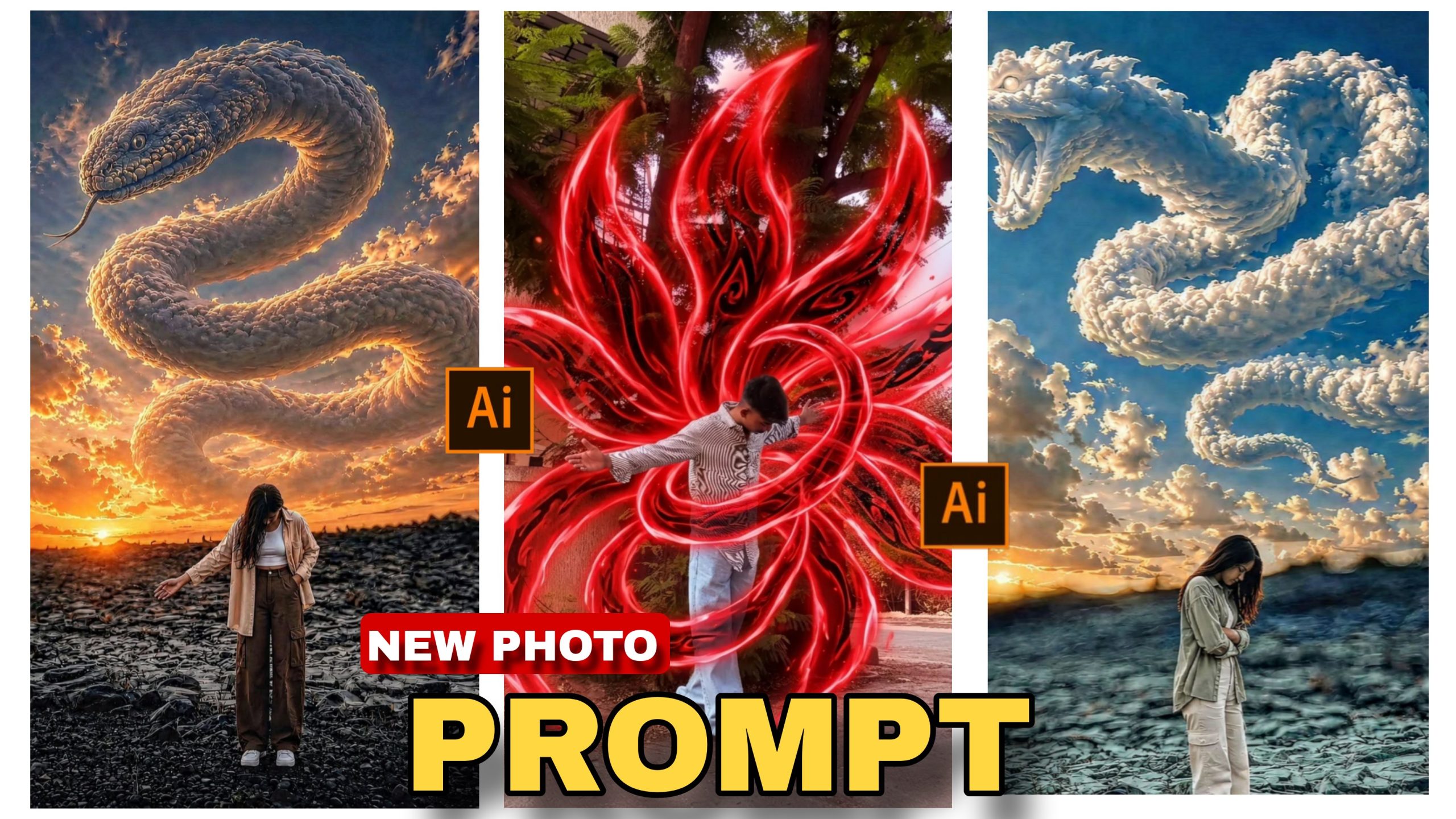
Aaj ke digital era mein, jahan social media platforms par har roz lakho photos aur reels upload hoti hain, wahan apni content ko standout karna ek bada challenge ban gaya hai. Agar aap Instagram, Facebook, ya Pinterest par dhyan dein, toh aapne notice kiya hoga ki cinematic aur fantasy photo edits ka craze alag hi level par chal raha hai. Special wo photos jahan aasmaan (sky) mein ek giant, majestic dragon clouds se bana hua dikhta hai, aur niche ek single character ek dramatic pose mein khada hota hai. Yeh ek epic, Hollywood movie-jaisa scene create karta hai jo kisi bhi viewer ko scroll karne se rok deta hai…
Pehle ke time mein aisi photos aur scenes create karne ke liye advanced level ki photo manipulation skills, complex masking, aur ghanto ki mehnat lagti thi. Lekin ab technology itni advance ho chuki hai ki aapko ghanto computer screen ke samne baithne ki zaroorat nahi hai. Sirf ek perfect text prompt ka use karke aap aisi mind-blowing, ultra-realistic images sirf kuch seconds mein generate kar sakte hain. Is detailed article mein, main aapko AI Dragon Sky Photo Editing Prompt 2026 ka use karke ek jaw-dropping cinematic edit create karne ka pura process step-by-step bataunga. Chahe aap ek absolute beginner hon ya thoda bahut editing jante hon, yeh guide aapke skills ko next level par le jayegi.
Cinematic Fantasy Photo Edits Aaj Kal Itne Viral Kyun Hain?
Kisi bhi trend ko follow karne se pehle yeh samajhna zaroori hai ki wo aakhir itna popular kyun ho raha hai. Aaj ki fast-paced scrolling life mein, users sirf unhi visual content par rukte hain jo unhe ek alag duniya (alternate reality) ka experience dete hain. Cinematic fantasy edits aapki photos mein ek aisi powerful storytelling add karte hain, jo kisi normal aesthetic editing se possible nahi hai.
Jab ek user dekhta hai ki aasmaan mein ek giant dragon clouds ke form mein ubhar raha hai aur ek intense sunset lighting us pure scene ko aur bhi dramatic bana rahi hai, toh wo us photo ko na sirf like karta hai, balki apne dosto ke sath share aur save bhi karta hai. Yeh aesthetics specially gaming community, anime lovers, aur creative photo editors ke beech bahut popular hain. Is trend ko apni profile mein shamil karke aap apni social media reach, impressions, aur overall engagement ko organic tarike se kaafi hadd tak boost kar sakte hain. Visual hooks create karna hi aaj ke time ka sabse bada SEO aur social media growth secret hai.
Top AI Image Generators for Fantasy Editing in 2026
Ek perfect AI dragon sky image generate karne ke liye aapko sahi AI tool ka knowledge hona chahiye. Market mein kai saare AI models available hain, lekin best, sharp, aur cinematic results ke liye aap in top tools par bharosa kar sakte hain:
● Bing Image Creator (Powered by DALL-E 3): Agar aap free mein high-quality images generate karna chahte hain jo aapke text prompt ko accurately samajhti hon, toh yeh Microsoft ka tool sabse best option hai. Yeh fantasy elements aur glowing effects ko bahut achhe se render karta hai. Iska interface bhi bahut beginner-friendly hai
● Midjourney V6: Unprofessional creators ke liye jo extreme ultra-realistic aur cinematic lighting chahte hain. Is tool mein textures, skin details, aur shadow placements ka output bilkul real photography jaisa hota hai. Halanki yeh paid hai, par iske results unmatched hain.
● Leonardo AI: Yeh ek aur behtareen AI image generation platform hai jo specially cinematic, 3D art, aur fantasy styles ke liye famous hai. Isme aapko alag-alag pre-trained models mil jate hain jo fantasy edits ko ek alag hi depth dete hain.
The Secret: AI Dragon Sky Photo Editing Prompt 2026
Kisi bhi AI generation tool se best output nikalne ka sabse bada aur akela secret uska “Prompt” hota hai. Agar aapka prompt detailed, well-structured, aur visually descriptive nahi hai, toh result kabhi bhi aapki expectation se match nahi karega. Ek professional editor hamesha apne prompt mein lighting, camera angle, character pose, mood, aur environment ko clearly define karta hai.
Yahan main aapko wo exact, highly detailed text prompt de raha hoon jiska use karke aap bina kisi pareshani ke ek epic dragon sky photo create kar sakte hain. Aapko sirf is text ko copy karna hai aur apne AI tool mein paste karna hai:

Create an ultra-realistic cinematic fantasy scene at sunset with the exact same composition as the reference image: massive, majestic white-blue cloud dragon made entirely of clouds and mist swirling dramatically across the sky, a highly detailed dragon face with glowing icy blue eyes, sharp horns, open mouth, and long serpentine body looping through the clouds. The dragon should dominate the sky exactly like the original image, with dramatic volumetric clouds, epic fantasy atmosphere, and powerful divine energy. In the foreground, place a young girl standing alone on rocky ground in the exact same pose as the original boy: head slightly bowed down, arms folded close to chest, emotional and silent mood, full body visible, side profile stance. Keep the exact same camera angle, exact same sunset position near the horizon, same rocky landscape, same lighting, same dramatic blue-orange sky contrast, same perspective, same depth, same cinematicshadows. The girl should wear the exact outfit.

BEHIND AND AROUND HIM APPEARS MULTIPLE GLOWING RED ENERGY TENTACLES (CHAKRA -LIKE AURA), SWIRLING DYNAMICALLY IN THE AIR, WRAPPING AROUND HIS BODY IN A CIRCULAR MOTION. THE TENTACLES HAVE A SEMI -TRANSPARENT, FLUID ENERGY TEXTIRE WITH NEON RED GLOW AND DARK PATTERNS INSIDE.MAKE SURE CHARECTOR AND LIGHTING SAME AND TAIL 9 AND FULL COVER FAMRE AREAS
Prompt Breakdown (Yeh prompt kaam kaise
karta hai?):
● Volumetric Clouds & Divine Energy: Yeh keywords AI ko batate hain ki badal normal nahi hone chahiye, balki unme ek 3D depth aur magical glow hona chahiye
.● Blue-Orange Sky Contrast: Yeh ek classic Hollywood colour grading technique hai (Teal and Orange) jo scene mein maximum cinematic visual appeal add karti hai.
● Side Profile Stance & Emotional Mood: Yeh character mein ek mystery aur storytelling element dalta hai, jisse photo sirf ek wallpaper na lagkar ek movie ka scene lagti hai.
Is Cinematic Prompt Ko Apne Hisaab Se Customise Kaise Karein?
Ek smart aur pro editor wahi hota hai jo ek base prompt ko apni imagination ke hisaab se tweak (change) kar sake. Aap is AI Dragon Sky Photo Editing Prompt 2026 ko thoda modify karke hazaron unique variations bana sakte hain. Yahan kuch smart customisation ideas diye gaye hain:
1. Character Swap (Apna Character Choose Karein): Agar aapko photo mein young girl ki jagah koi aur character chahiye, toh aap prompt mein “young girl” ki jagah “a mysterious young boy wearing a dark cloak” ya “a modern streetwear model” likh sakte hain.
2. Dragon Ki Appearance Change Karein: Agar aapko icy blue dragon ki jagah ek aggressive aur aag ugalta hua dragon chahiye, toh “white-blue cloud dragon” ko change karke “fiery red and dark ash cloud dragon with glowing lava orange eyes” kar dein. Isse pure scene ka mood thanda se garam aur intense ho jayega.
3. Environment Aur Time of Day: “Sunset” ki jagah ek dark aur mysterious dark fantasy vibe ke liye “at sunset” ko replace karke “at midnight during a heavy thunderstorm with purple lightning” likh dein. Usi tarah “rocky ground” ko “top of a futuristic skyscraper” se change kiya ja sakta hai.
Bonus Tip: Professional Colour Grading Hacks in:
Lightroom Koi bhi photo sirf AI se generate karne ke baad 100% perfect ya internet-ready nahi hoti. Usme real life wali jaan dalne ke liye colour grading sabse bada aur aakhiri hathiyar hota hai. Apni AI-generated photo ko apne mobile mein Lightroom ya Snapseed application mein import karein aur in basic lekin powerful settings ko apply karein:
● Contrast Aur Shadows Adjustments: Cinematic look hamesha dark, deep shadows se aata hai. Shadows ko thoda decrease karein (-15 tak) aur contrast ko +15 ya +20 tak
badhayen taaki character aur piche ka background ek dusre se alag (pop out) dikhein.
● Colour Temperature (Temp): Kyunki hamara base prompt sunset par aadharit hai, isliye Temperature slider ko thoda Warm (yellow/orange side) ki taraf slide karein. Isse golden hour ka effect aur bhi zyada organic aur real lagega.
● Vignette Effect: Image ke chaar corners ko thoda dark karne ke liye Vignette tool apply karein. Isse photo ke edges dark ho jayenge aur dekhne wale ka poora focus seedhe aasmaan ke us majestic dragon aur niche khade character par jayega.
● Clarity aur Texture: Badalon (clouds) aur dragon ke mist effect ki details ko sharp dikhane ke liye clarity ko +20 aur texture ko +10 tak zaroor badhayein. Yeh image ki sharpness ko enhance karta hai. Common Mistakes Beginners Should Avoid Jab bhi koi beginner AI photo editing ki duniya mein kadam rakhta hai, toh wo kuch aisi common galtiyan karta hai jisse photo nakli (fake) ya over-edited lagne lagti hai. Ek professional output ke liye in galtiyon se hamesha bachein:
● Chhote aur Adhure Prompts Likhna: AI mind-reader nahi hai. Agar aap sirf “dragon in sky with a person” likhenge, toh output bahut hi basic aayega. Hamesha lighting, mood, aur environment ko clearly define karein.
● Over-Saturation Karna: Colour grading karte waqt Saturation slider ko bahut zyada badha dena ek bohot badi galti hai. Isse colours aakhon me chubhne lagte hain aur photo ka realistic texture puri tarah khatam ho jata hai. Colours ko hamesha thoda muted aur natural rakhein.
● Lighting Direction Ko Ignore Karna: Agar aap character ka face swap kar rahe hain, toh dhyan rakhein ki face ki lighting background ki lighting se match karni chahiye. Agar sunset peeche hai, toh character ka face dark (silhouette form) mein aana chahiye na ki bright lit.
● Perspective Mismatch: Character aur background ke size ka ratio logical hona chahiye. Agar dragon massive hai, toh character ko chhota dikhna chahiye taaki us dragon ka scale aur size mehsoos ho sake.
Conclusion
Is trending AI Dragon Sky Photo Editing Prompt 2026 ka sahi use karke aur upar batayi gayi colour grading tips ko follow karke, aap apni normal photos ko ek mind-blowing cinematic masterpiece mein badal sakte hain. Bas apne prompts ke sath naye experiments karte rahiye, apni creativity ko explore kijiye, aur roz kuch naya seekhte rahiye. Keep creating and keep