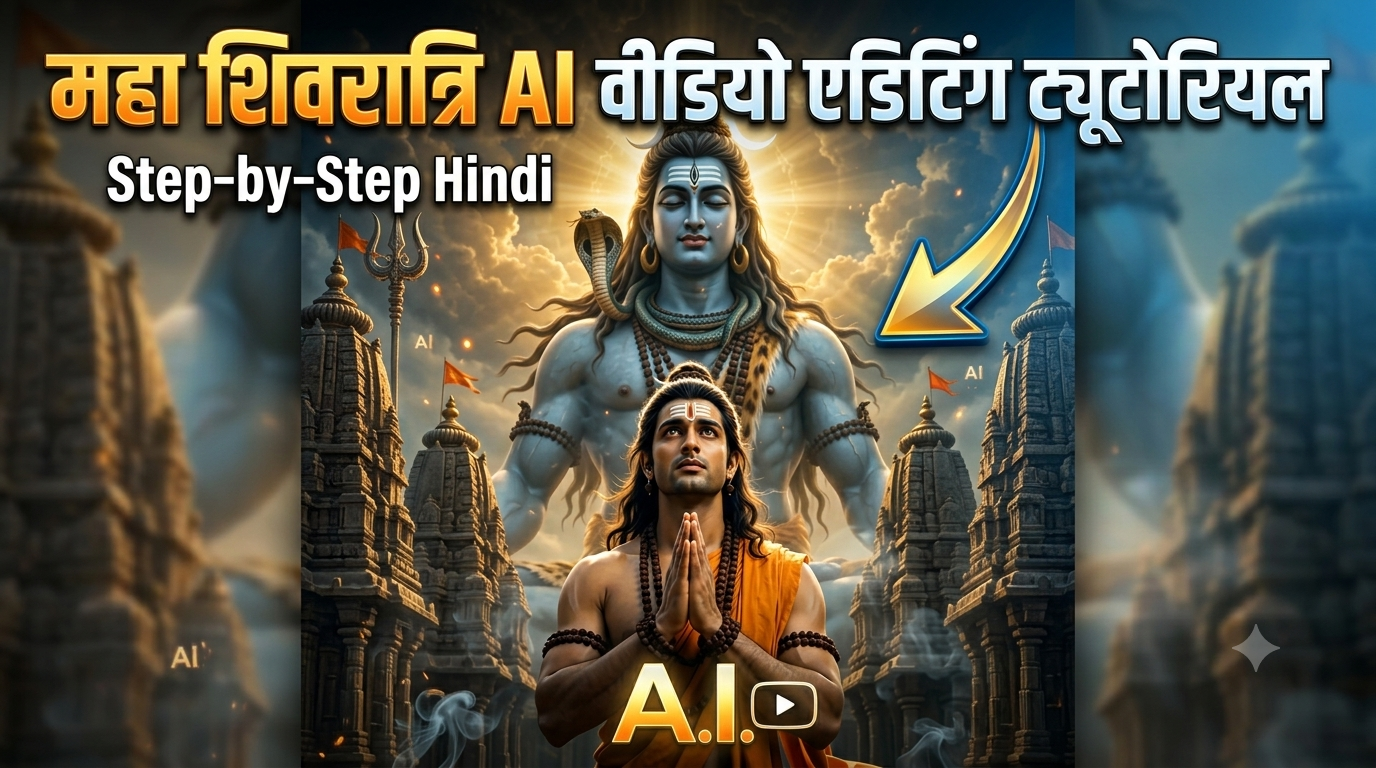
Maha Shivaratri ke festive season mein social media par devotional reels aur videos ka trend peak par chala jata hai. Aaj kal AI video editing ki madad se apni normal photo ko cinematic Lord Shiva devotional video mein convert karna bahut hi aasan ho gaya hai. Agar aap bhi is festival season mein trending Maha Shivaratri AI Video Editing seekhna chahte hain aur apni photo se ek ultra-realistic 3D Bholenath status video banana chahte hain, toh yeh guide bilkul aapke liye hai. Is guide mein hum ChatGPT aur Google AI Flow ka use karke step-by-step poora process seekhenge.
Trending Bholenath Photo-to-Video Editing Kya Hai?
Instagram Reels aur YouTube Shorts par filhal Bholenath AI Photo-to-Video trend kafi tezi se viral ho raha hai. Isme aapko kisi heavy video editing software (jaise Premiere Pro ya After Effects) ki zaroorat nahi padti. Aap bas apni ek clear photo ka use karke aur sahi AI prompts ke sath 3D Devotional Poster banate hain aur fir use ek smooth 8-second cinematic animation video mein badal dete hain. Is poore process ko do main parts mein baata gaya hai:
- ChatGPT AI Photo Generation: Apni face identity preserve karke Mahadev Poster create karna.
- Google AI Flow Image-to-Video: Us photo ko dynamic lighting aur natural movement ke sath video mein badalna.
Step 1: ChatGPT Se Devotional Mahadev AI Photo Kaise Banaye?
Pahle step mein hum ChatGPT ka use karke ek high-resolution Maha Shivaratri AI Photo generate karenge, jisme aapka face bilkul original rahega aur background mein Lord Shiva ka grand look dikhai dega.
Detailed Step-by-Step Process:
- Sabse pehle apne phone ya laptop mein ChatGPT open karein.
- Apni ek clear front-facing photo upload karein (dhyan rahe face par lighting achhi honi chahiye).
Photo upload karne ke baad, neeche diya gaya exact ChatGPT Prompt copy karke paste karein aur send kar dein.
ChatGPT Photo Prompt:
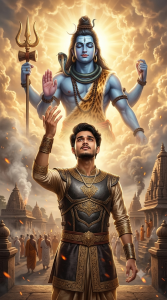
Use the uploaded photo as the identity reference. Preserve the exact face, hairstyle, skin tone, age, and gender. Create a cinematic Mahadev-inspired devotional portrait with the person in an elegant traditional warrior outfit, one hand raised toward the sky. Show a colossal Lord Shiva emerging from glowing golden clouds behind them, surrounded by ancient temples, embers, smoke, and divine light. Ultra-realistic, dramatic, premium movie-poster look, 9:16, no text or watermark.
ChatGPT kuch hi seconds mein aapki identity ko retain karte hue ek stunning Maha Shivaratri AI Poster tayar kar dega.
Is image ko full HD resolution mein Download kar lein.
Step 2: Google AI Flow Se Photo Se Video Kaise Banaye?
Ab aapki photo ready ho chuki hai. Next step mein hum is static photo ko Google AI Flow (Veo AI) ki madad se ek realistic 8-second video mein animate karenge.
Detailed Step-by-Step Process:
- Chrome browser open karein aur Google AI Flow ki official website par jayein.
- Vahan Image-to-Video option par click karein aur ChatGPT se download ki hui Mahadev photo ko Upload karein.
- Photo upload hone ke baad, neeche diya gaya exact Video Prompt vahan prompt box mein paste karein.
Google AI Flow Video Prompt:

Create a cinematic 8-second image-to-video shot using the provided devotional poster as the exact visual reference. Keep the same person, face, hairstyle, outfit, Lord Shiva, temples, golden clouds, lighting, and overall composition consistent. The person slowly lowers the raised hand and brings both hands together in a respectful namaste, looking upward toward Lord Shiva with deep devotion. Lord Shiva gently raises his right hand in a divine blessing gesture, while soft golden energy flows from his palm toward the person. Clouds move slowly, divine light rays intensify, smoke drifts naturally, and glowing embers float through the air. Add subtle movement in the person's clothes, hair, rudraksha beads, and Shiva's flowing hair. Use a slow cinematic camera push-in with slight upward movement, ultra-realistic Indian mythological movie quality, smooth natural motion, powerful spiritual atmosphere, no dialogue, no text, no watermark, 9:16.
Prompt enter karne ke baad Generate Video button par click kar dein.
Google AI Flow kuch hi seconds mein photo ke andar smooth camera movement, clouds motion, floating embers, aur hand movement add karke 9:16 aspect ratio mein video bana dega. Video preview dekhne ke baad ise high quality mein Download kar lein.
Prompts Kahan Se Milege? (Royeditz.in)
Agar aapko is tarah ke aur bhi latest trending, high-quality, aur alag-alag styles wale AI prompts chahiye, toh aap royeditz.in ki official website par visit kar sakte hain. Royeditz.in website par aapko Maha Shivaratri AI Video Editing ke saare copy-paste prompts ek hi jagah par bilkul free mein mil jayenge, jahan se aap directly prompts copy karke apni manpasand AI photos aur videos generate kar sakte hain.
Bonus Editing Tip: Reel Ko Viral Kaise Karein?
AI se video generate karne ke baad use social media par upload karne se pehle yeh small workflow tweaks zaroor apply karein:
Trending Audio Sync: Video ko CapCut ya VN Video Editor mein import karein aur kisi trending Har Har Mahadev status sound ya powerful devotional BGM ke sath sync karein. Color Adjustments: Video ka glow badhane ke liye Vibrance (+8) aur Contrast (+5) thoda increase karein. Text Overlay: Video ke top ya bottom mein simple clean font mein “Har Har Mahadev” ya “Maha Shivaratri Special” likhein.
Conclusion
Maha Shivaratri AI Video Editing karna aasan hai agar aap sahi tools aur prompts ka combination use karte hain. ChatGPT se HD devotional poster banane ke baad Google AI Flow se use cinematic video mein badalna sirf 2 minute ka kaam hai. Aaj hi royeditz.in se prompts lekar apni unique video banayein aur social media par share karein!